93 slides extracted.
Slide 1 — 0:08 (watch)
 | It's nice to meet you all. |
Slide 2 — 0:20 (watch)
 | I'm Ash, and this is Andrew. We both work as engineers in the Applied AI team at Anthropic. |
Slide 3 — 0:36 (watch)
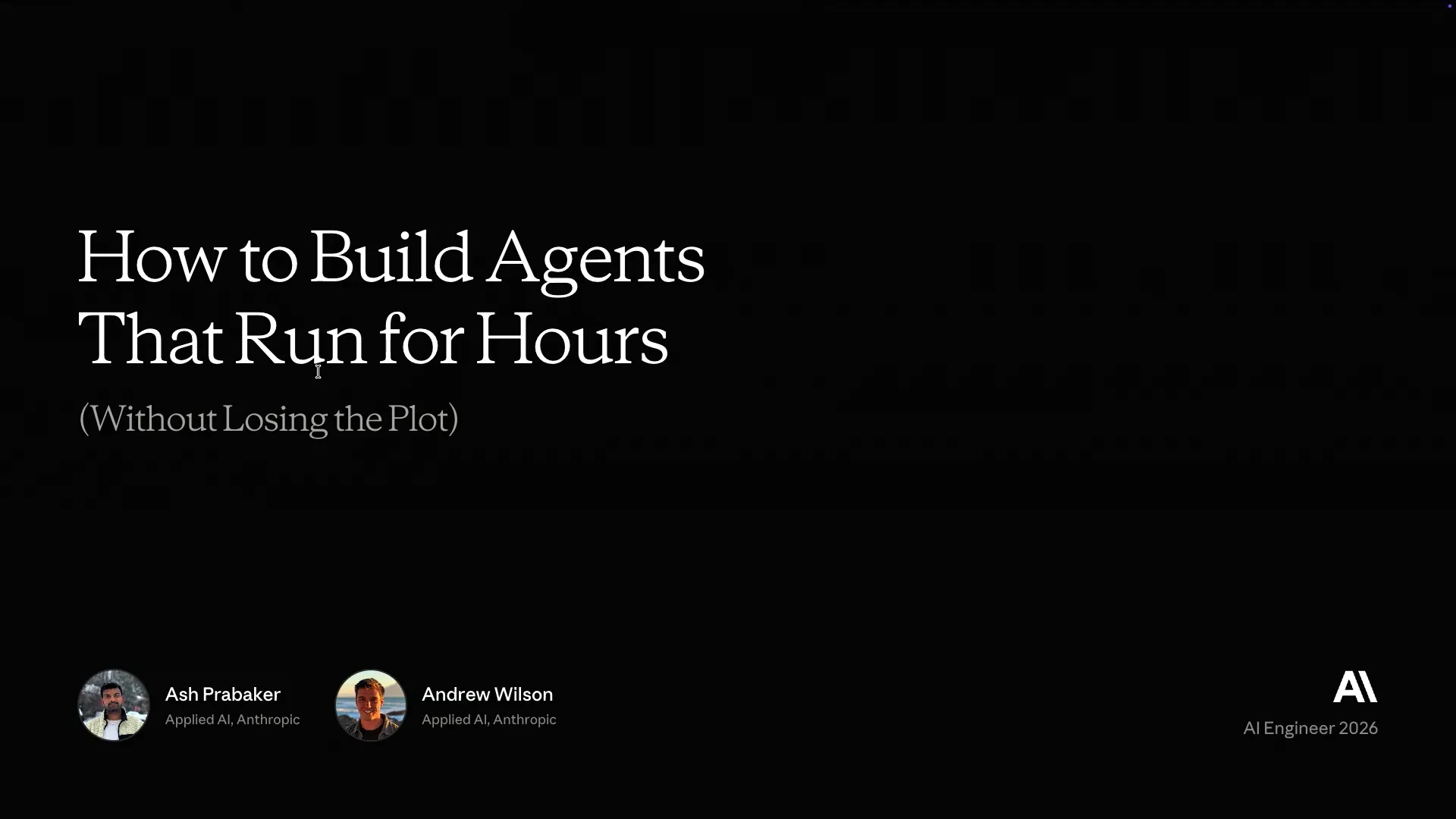 | This session is inspired by a blog post we published a couple of weeks ago about building agents that can run for extended periods, specifically five to six hours or more. |
Slide 4 — 0:52 (watch)
 | Many companies showcase demos where they claim to have successfully automated a browser, but they often do not provide details about the underlying harness. Today, we want to discuss those important details. |
Slide 5 — 1:02 (watch)
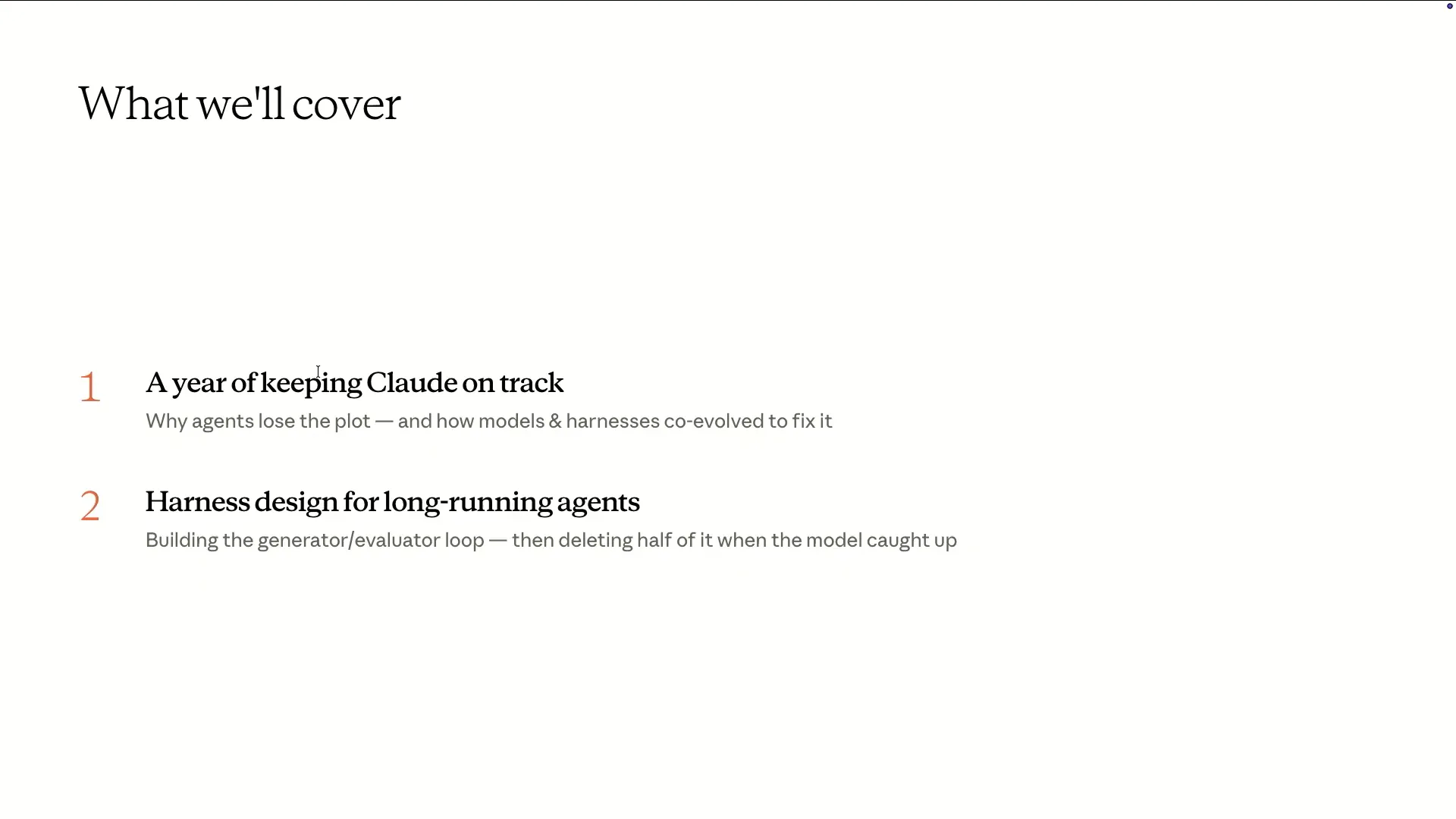 | In the first half, my colleague Andrew will discuss how we arrived at this point, the primitives we've implemented in our code, and our current status. |
Slide 6 — 1:14 (watch)
 | I will return to discuss some of the more experimental aspects we are exploring, including the harnesses and a few examples of our findings. Thank you, Ash. |
Slide 7 — 1:38 (watch)
 | Thank you for joining our first session of the AI Engineer Conference. I'm Andrew from the Applied AI team in London, where I work as a solution architect with many of our digital native and industry customers. I will provide a historical overview focused on the developments that enable agents to run for multiple hours or even days. After that, I will hand over to Ash for a discussion on the state of the art. |
Slide 8 — 2:04 (watch)
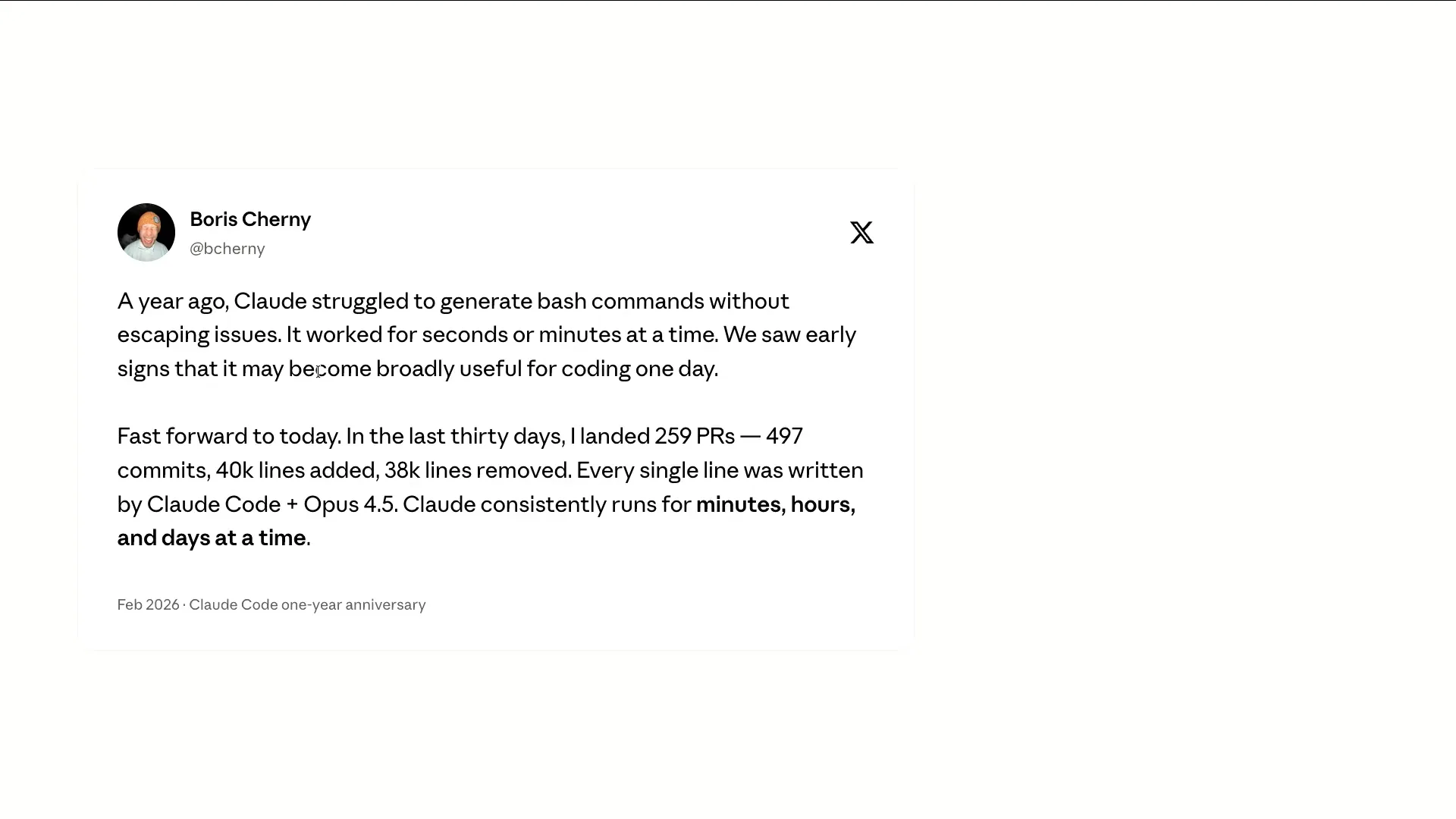 | Boris, the creator of Cloud Code, shared a quote on Twitter to mark the one-year anniversary of Cloud Code. He noted that a year ago, Cloud was struggling with writing bash commands and escaping strings. |
Slide 9 — 2:22 (watch)
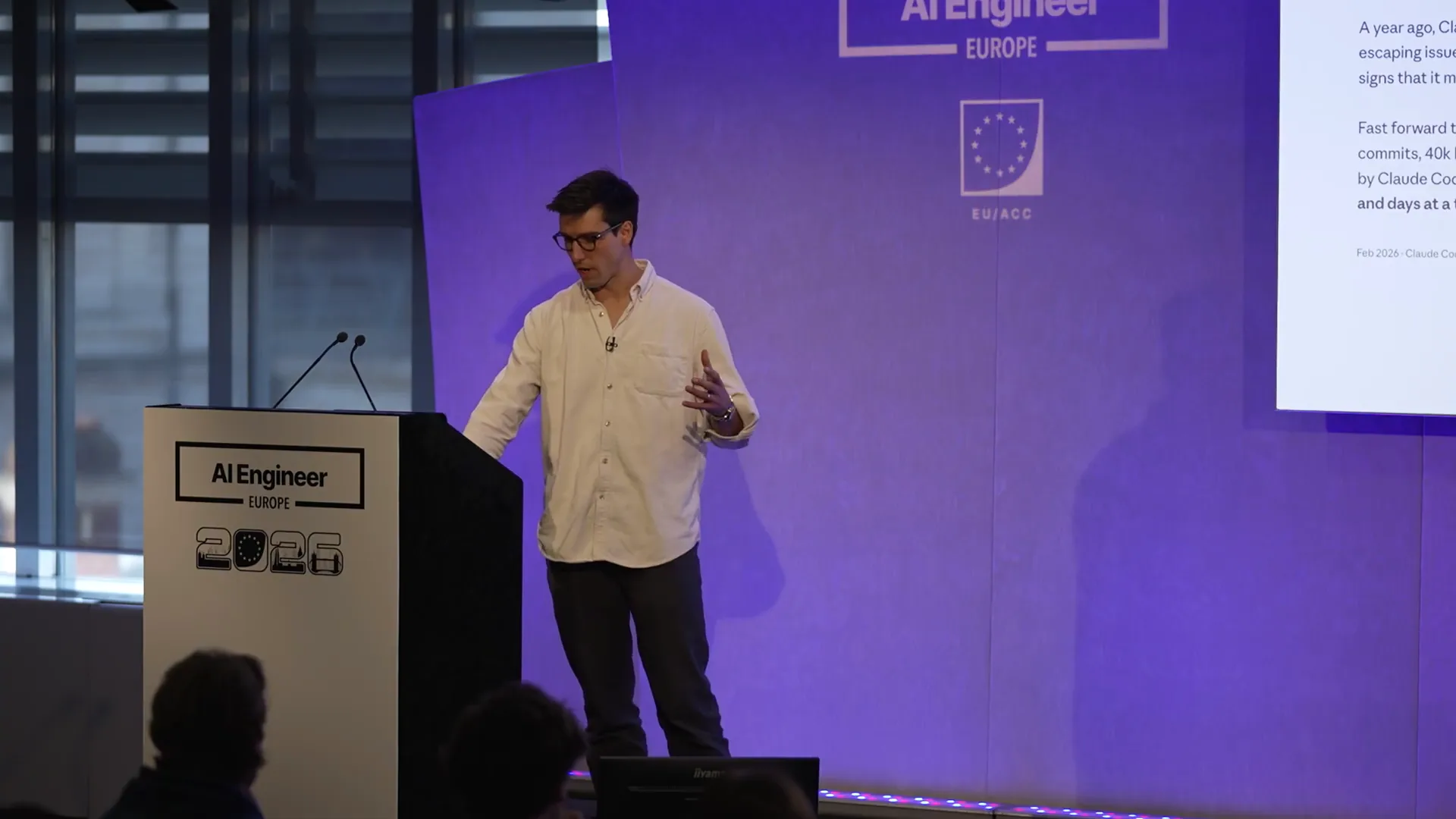 | Initially, the system could run for about 20 minutes at a time. Now, almost all of Cloud Code is generated by Cloud Code itself, and it can operate effectively for days. This represents a significant improvement over the past year. I will now discuss the history of this development. To frame the problem, it's important to understand why it is challenging for these agents to run for extended periods. |
Slide 10 — 3:10 (watch)
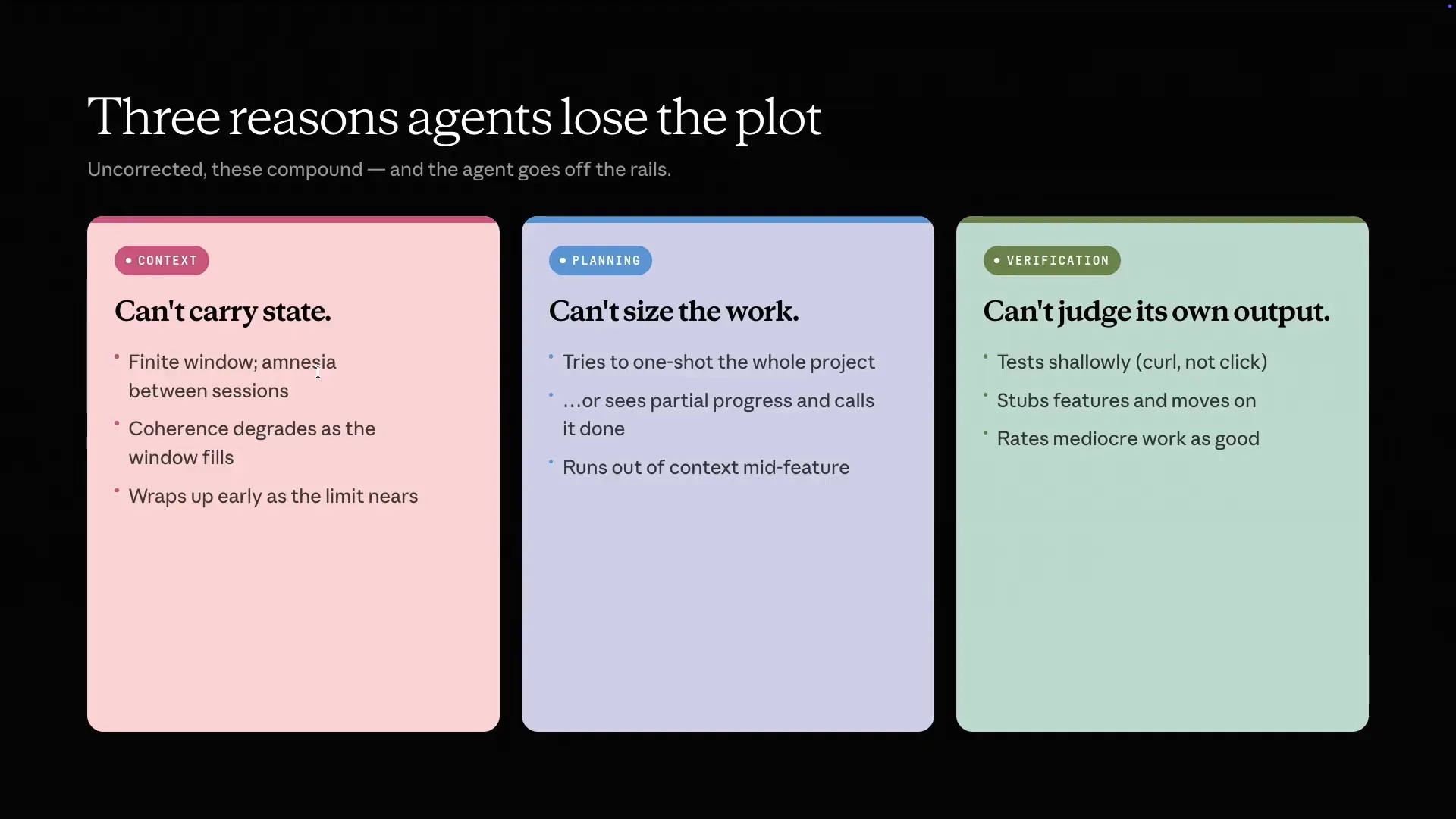 | There are three main challenges. First is context. The context window is finite, leading to a kind of amnesia when a new session starts, requiring some memory components. As the session progresses, coherence diminishes due to context rot. Additionally, models can experience context sense anxiety, becoming nervous as they approach the end of their context window and rushing to complete tasks. Second is planning. Models generally struggle with planning and may attempt to accomplish everything in one go. For instance, they might only partially implement a feature or run out of context, leaving applications incomplete. Lastly, models are poor at evaluating their own output. While they often provide responses that align with user expectations, this tendency also affects coding tasks. |
Slide 11 — 4:02 (watch)
 | Models can misjudge the completeness of their output. For instance, they might evaluate a feature and conclude that it is finished, even if it is only partially implemented. They may create a button without a functioning backend, leading to the appearance of completion despite the lack of functionality. Ash will discuss new techniques to improve models' ability to assess their own outputs. There are two primary approaches to address these issues. |
Slide 12 — 4:34 (watch)
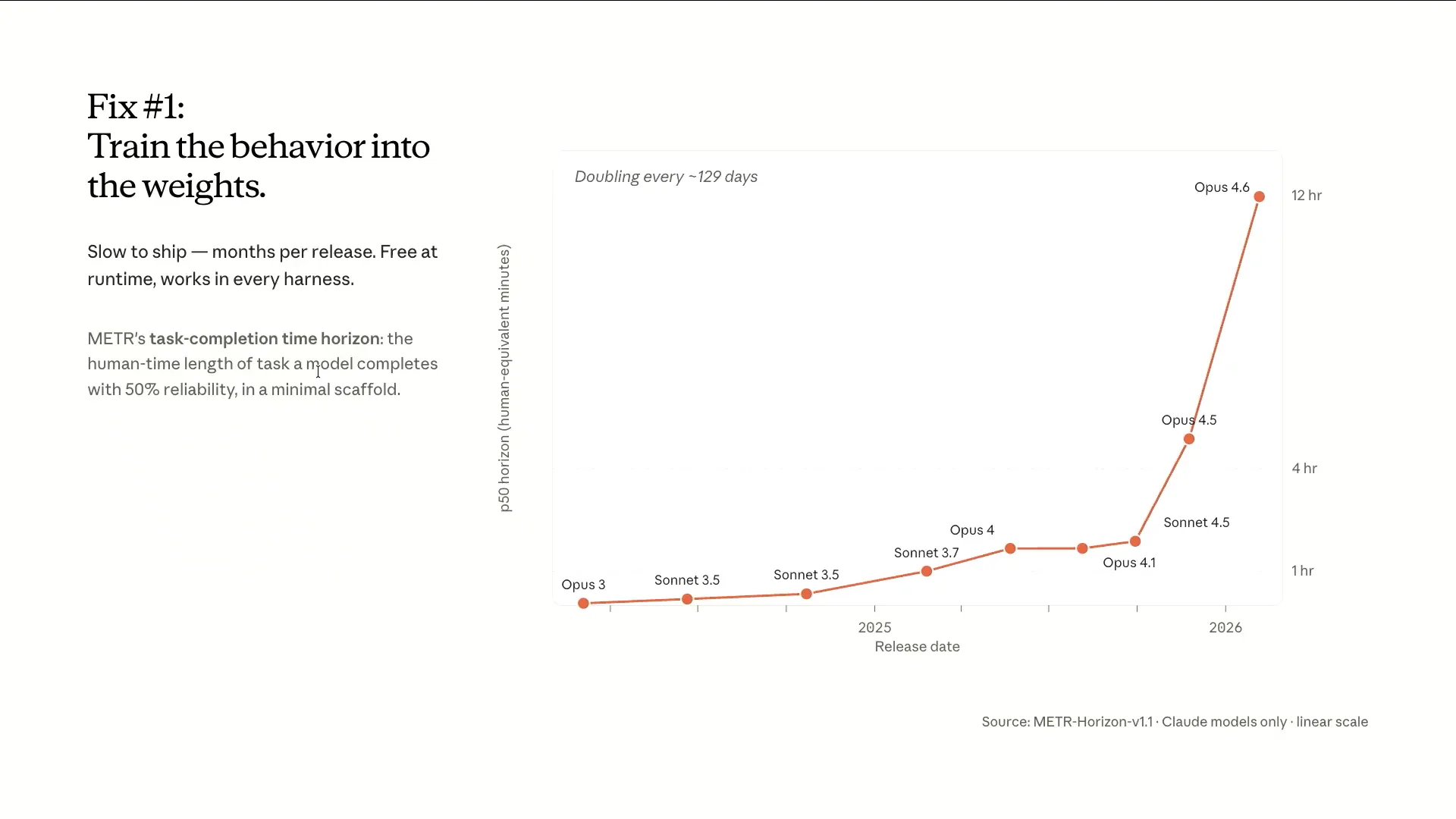 | The first approach involves integrating improvements directly into the model weights. The meter chart illustrates how long an agent can operate with a minimal scaffold while completing 50% of tasks. For Opus 3.7, the runtime is approximately one hour, while Opus 4.6, released a year later, shows a runtime of 12 hours, or an entire day. We have successfully extended this runtime even further, and others have achieved similar results, but this example demonstrates a very minimal scaffold. |
Slide 13 — 5:16 (watch)
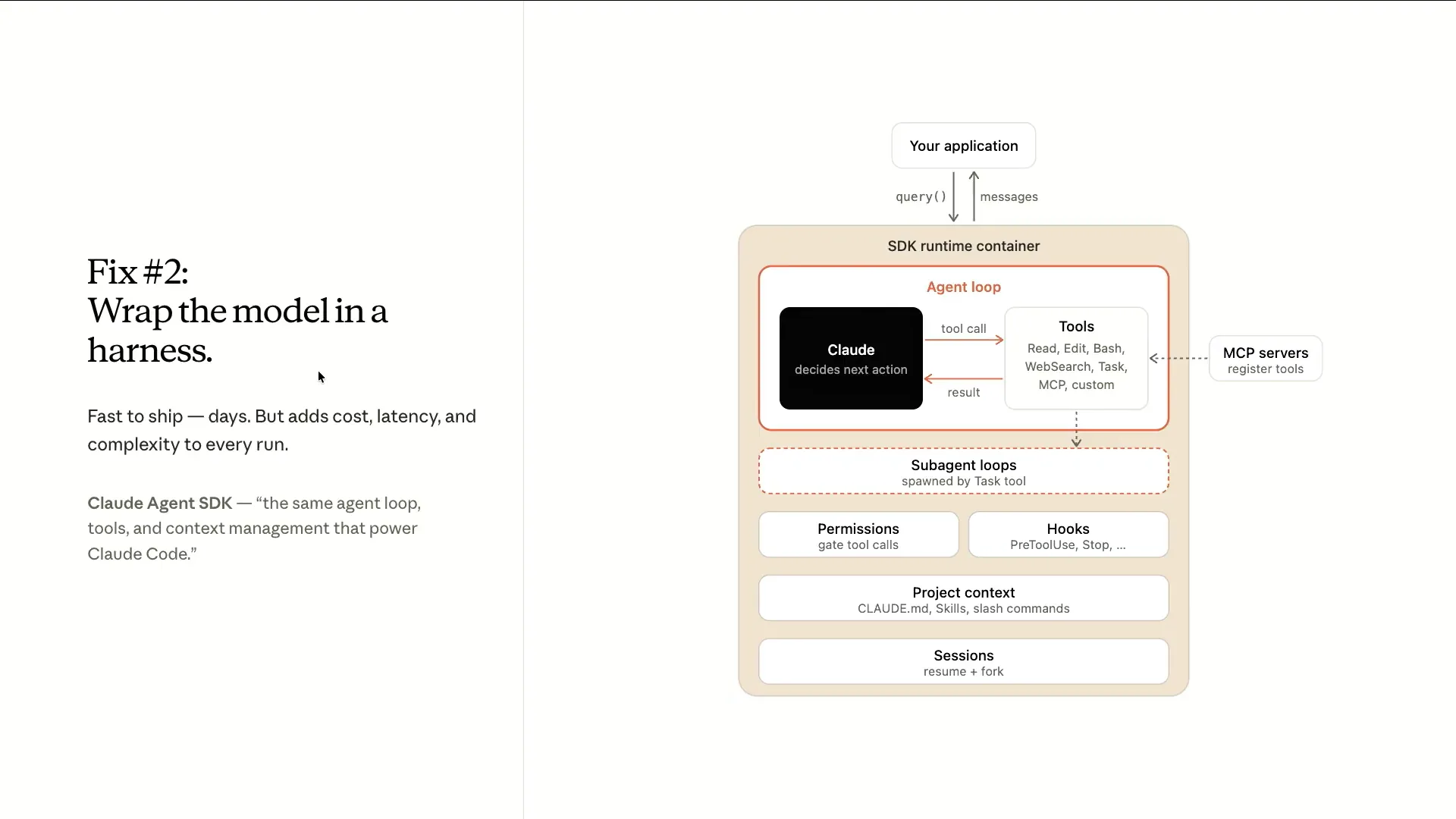 | The second thing you can do is make changes to the harness itself, which is the scaffolding around the model. We have the agent SDK that includes all the primitives we've been developing over time. This includes the core agent loop, where the Claude model determines actions and which tools to run. It may pull in tools from MCP servers, delegate tasks to a sub-agent, and incorporate context from sources like Claude.md, loaded skills, or slash commands. There is also a comprehensive permission system in place. This framework will evolve as the models improve. You can use it to build your own harness for your specific applications, such as the long-running agents that Ash will demonstrate later. |
Slide 14 — 5:54 (watch)
 | Over the past year, we have observed that each model release has been accompanied by significant changes to the harness. This indicates that the models and the harness are co-evolving. To provide context, let's first review the developments that occurred prior to this past year. |
Slide 15 — 6:18 (watch)
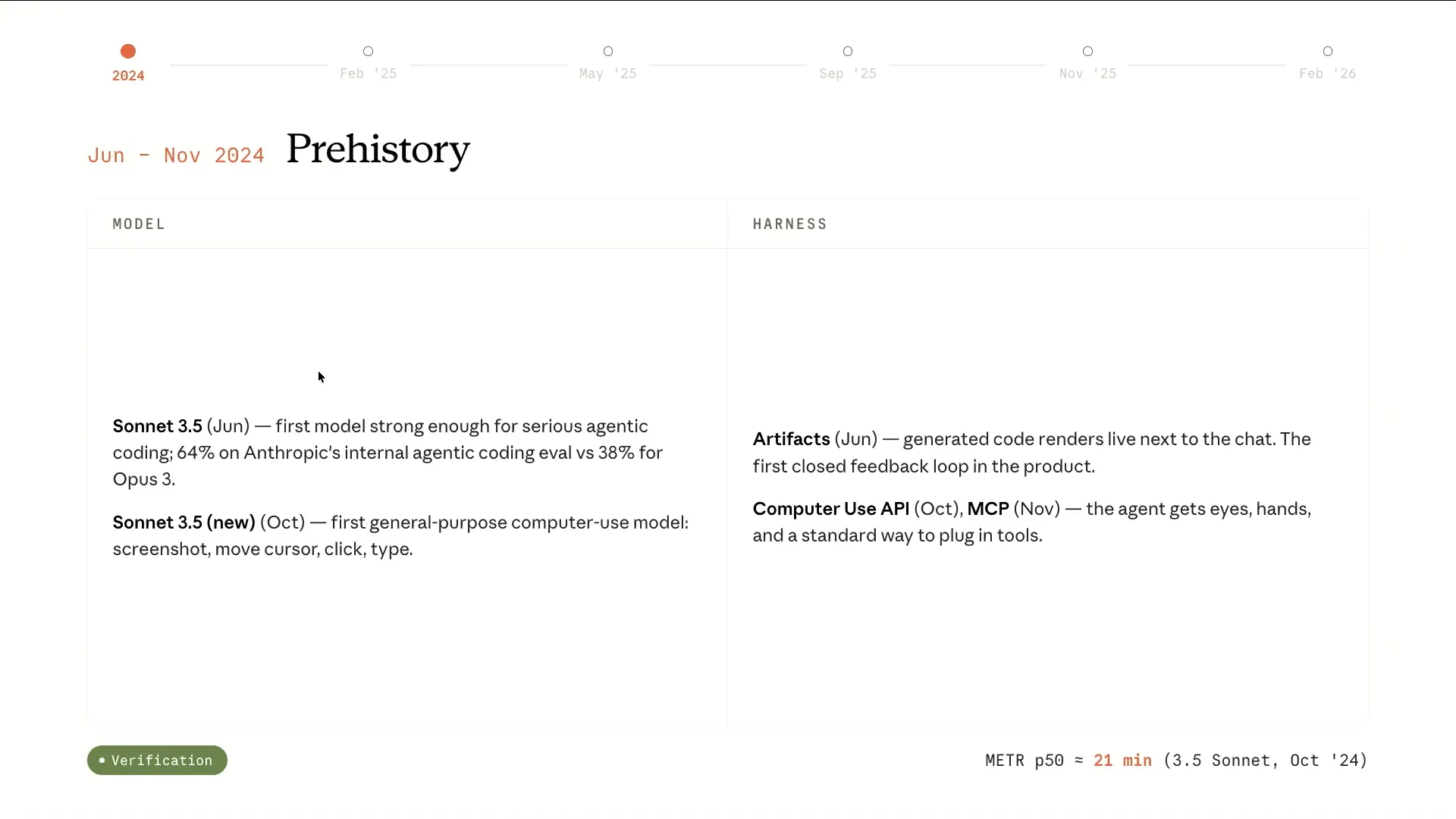 | We all remember the period when Claude featured the artifact section of Claude.ai. Sonnet 3.5 was the first model that demonstrated significant promise in coding capabilities. It could verify its own outputs and iterate on them, marking an important breakthrough in pre-Claude code. Additionally, we introduced computer use, allowing it to interact with its environment by clicking around, taking screenshots, and testing its own code, along with the MCP specification, which enabled it to utilize various tools. |
Slide 16 — 6:46 (watch)
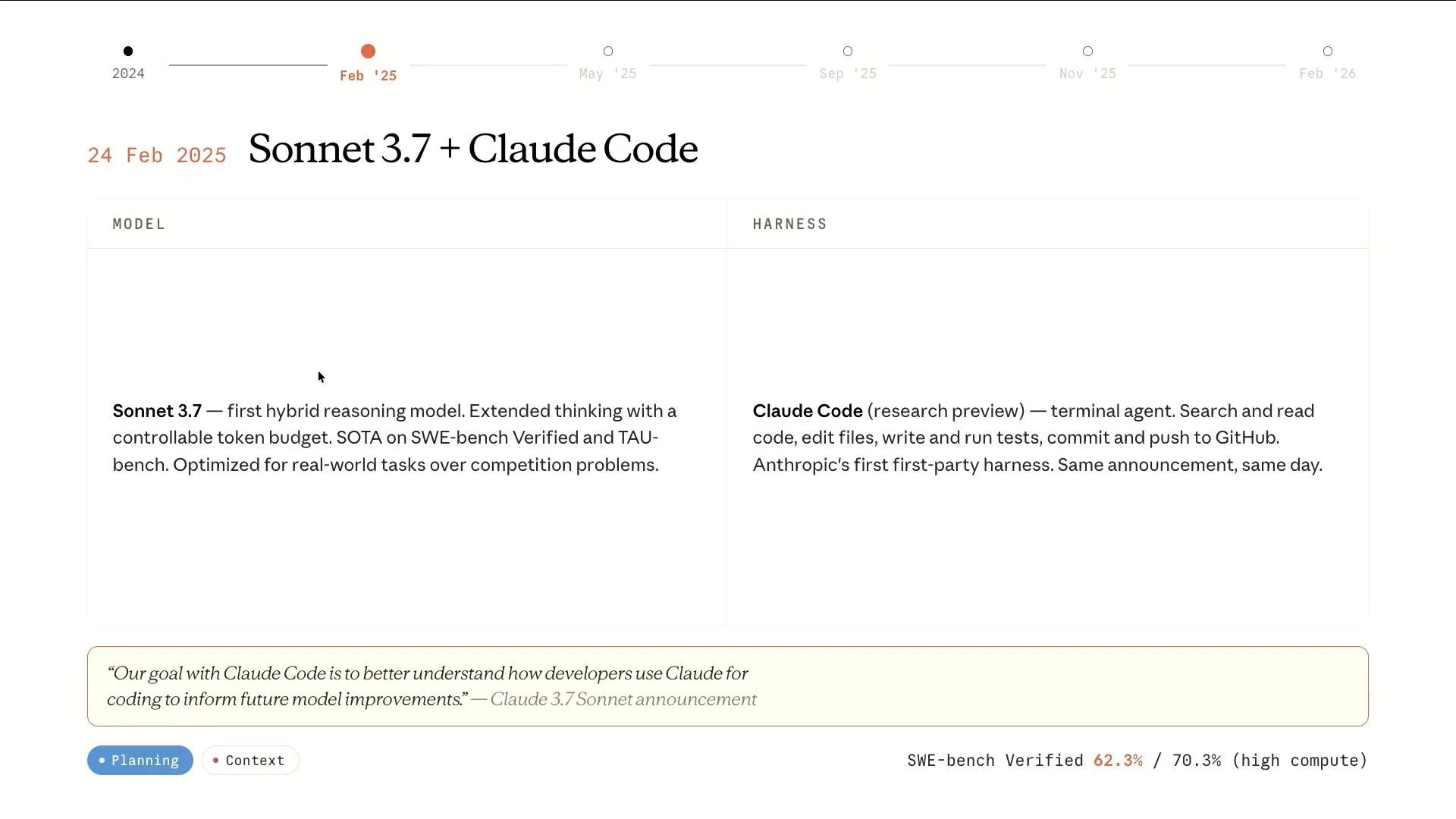 | In February 2025, we introduced Claude code, which was released in Research Preview alongside Sonnet 3.7, representing the state-of-the-art on SWEbench. A notable aspect of this release was its goal: to better understand how developers utilize Claude for coding, which would inform future model improvements. |
Slide 17 — 7:14 (watch)
 | When we released Claude code, the goal was to make it somewhat experimental to inform improvements to the base model. Over time, the models will become better, and certain aspects of the harness may become less necessary or evolve. In the bottom left corner of these slides, you can see the focus areas of these releases, including context, planning, verification, and some statistics. I won't read everything in detail. |
Slide 18 — 7:44 (watch)
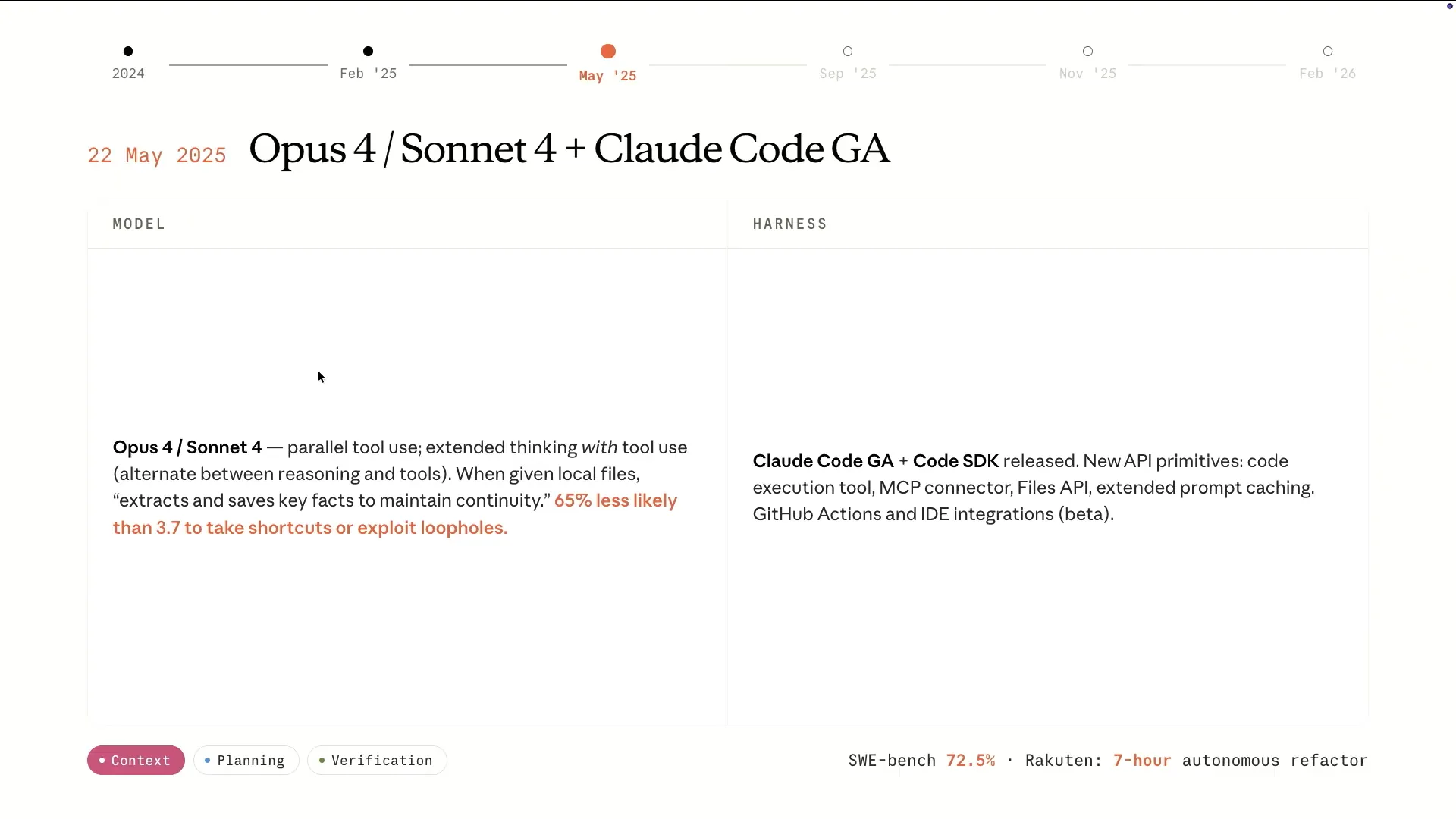 | In May of last year, Opus 4 and Sonnet 4 were released. These tools significantly improved their ability to manage context and achieve task completion without resorting to reward hacking. Additionally, Claude code reached General Availability (GA), and we released the Claude code SDK, which serves as the harness for Claude code. |
Slide 19 — 8:20 (watch)
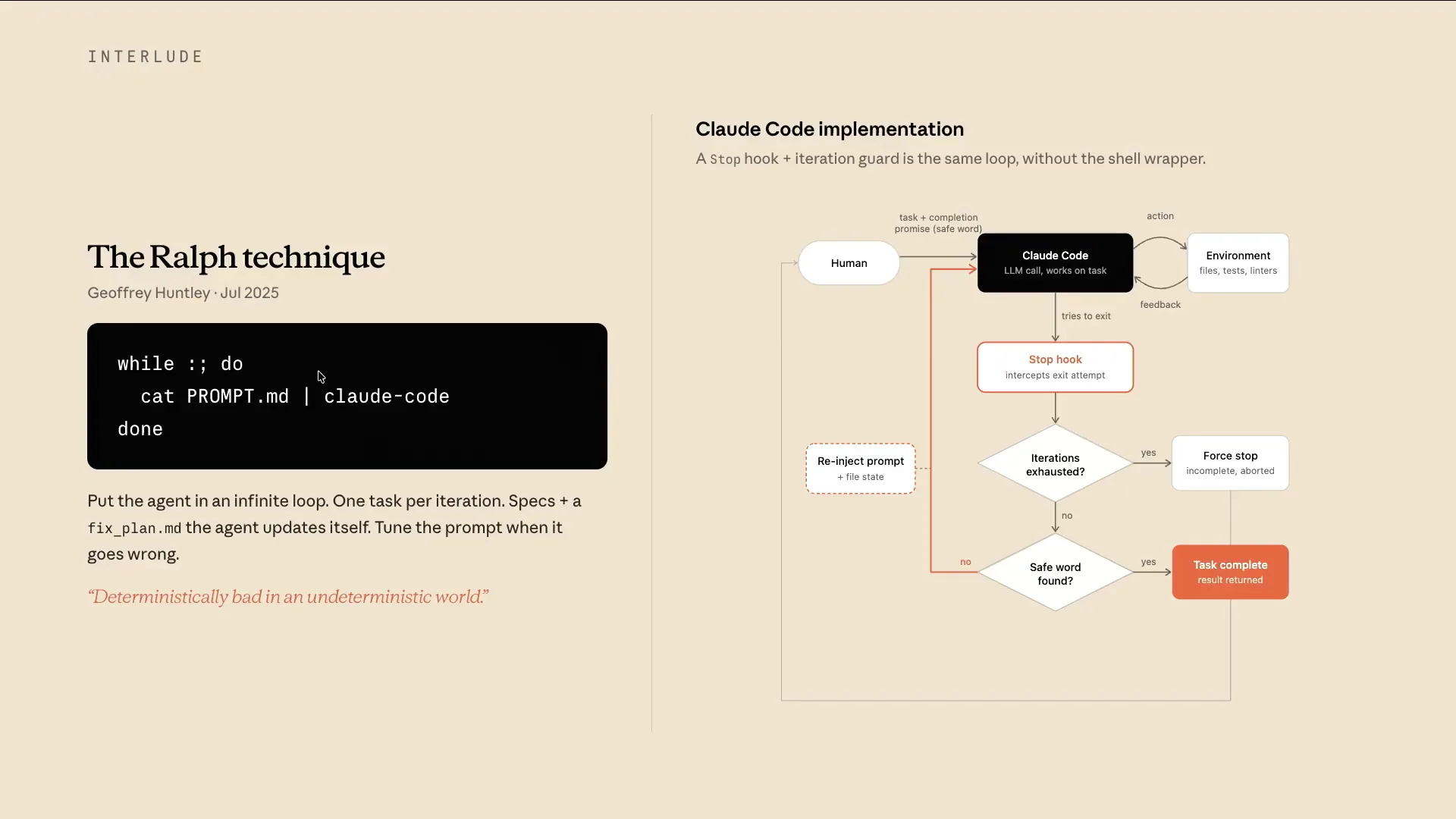 | This slide presents a brief interlude in the timeline. The Ralph Wiggum technique was introduced last July when Geoffrey Huntley released the initial paper. It gained significant traction around December of last year, as many began experimenting with it. Claude also implemented our own Ralph loop within the Claude code harness. This technique is relatively straightforward: it involves taking a prompt, feeding it into the Claude code CLI, and running it in a loop until all tasks are complete. However, it is more nuanced than it appears. Initially, there is a planning phase where the prompt is broken down into several features. The system then selects one task from these features, starts a new session, and works with a fresh context window. |
Slide 20 — 9:12 (watch)
 | Many of these concepts were applied in the Ralph loop, which gained attention for its seemingly simplistic approach. It operates under the principle that it's better to fail predictably than to succeed unpredictably. When we developed our own plugin for this in Claude code, some may argue that it doesn't represent a true Ralph loop. The key distinction is that it runs within a single Claude code session without creating a fresh context window; instead, it relies on compaction over time. |
Slide 21 — 9:38 (watch)
 | While it may not be considered a true Ralph loop, you would set the maximum iterations and a safe word. A stop hook would then intercept when Claude typically stops. |
Slide 22 — 9:46 (watch)
 | If it's not finished, it will continue until it meets one of those exit criteria. |
Slide 23 — 10:14 (watch)
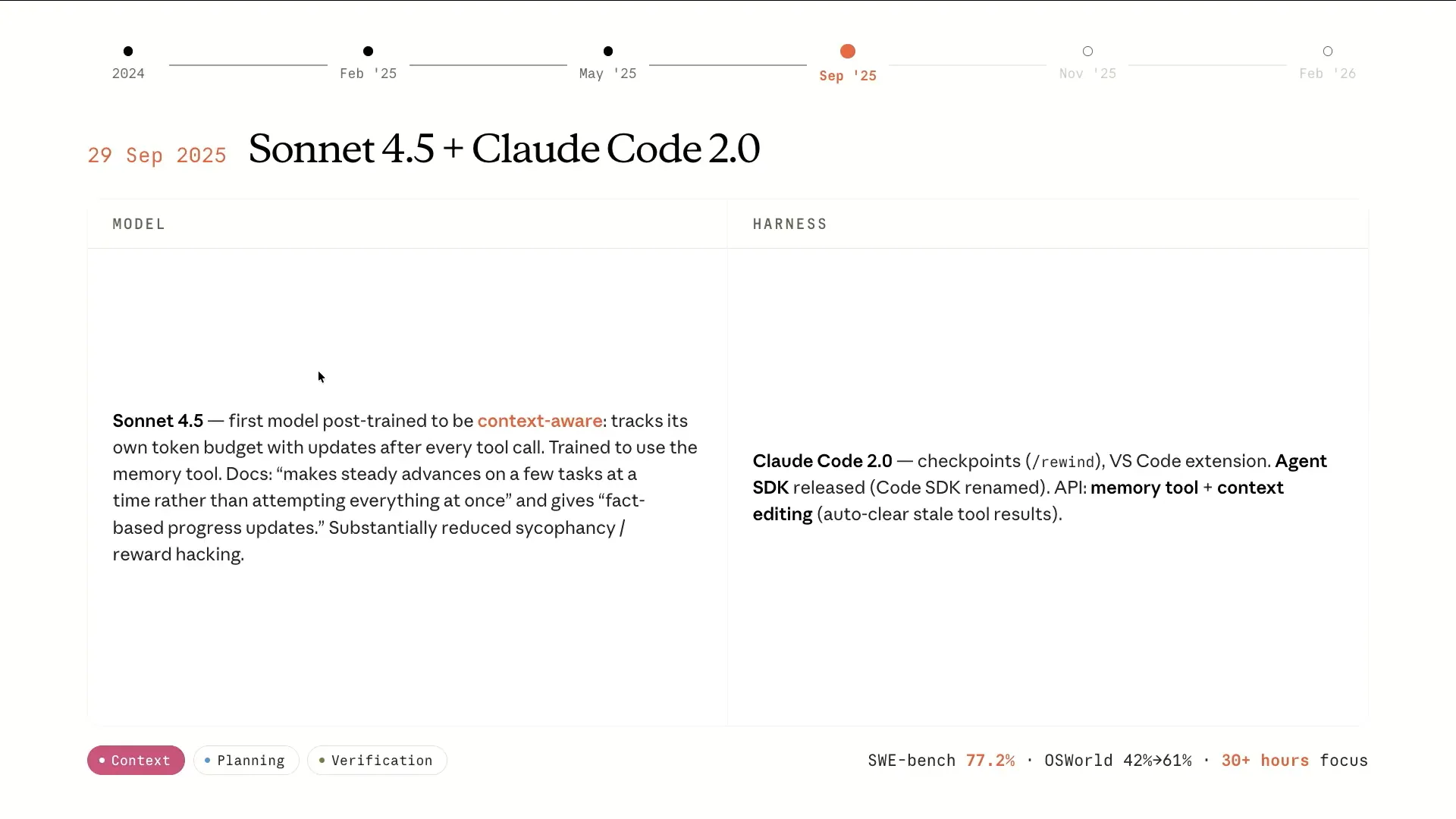 | On to Sonnet 4.5. The model began to improve in handling its own context, becoming more aware of how many tokens had been consumed. As it approached the end of the context window, it understood this limitation and managed its own context effectively. Claude Code 2.0 was also released, introducing checkpoints that allowed tracking of the code over time and the ability to rewind to previous parts of the session. Additionally, we renamed the Claude Code SDK to the Agent SDK, recognizing its broader applicability beyond just coding. While we are discussing coding extensively now, it's important to note the potential for applying these long-running harnesses to other domains as well. |
Slide 24 — 10:42 (watch)
 | At this point, we can run for about 30 hours with Claude Sonnet 4.5. |
Slide 25 — 11:16 (watch)
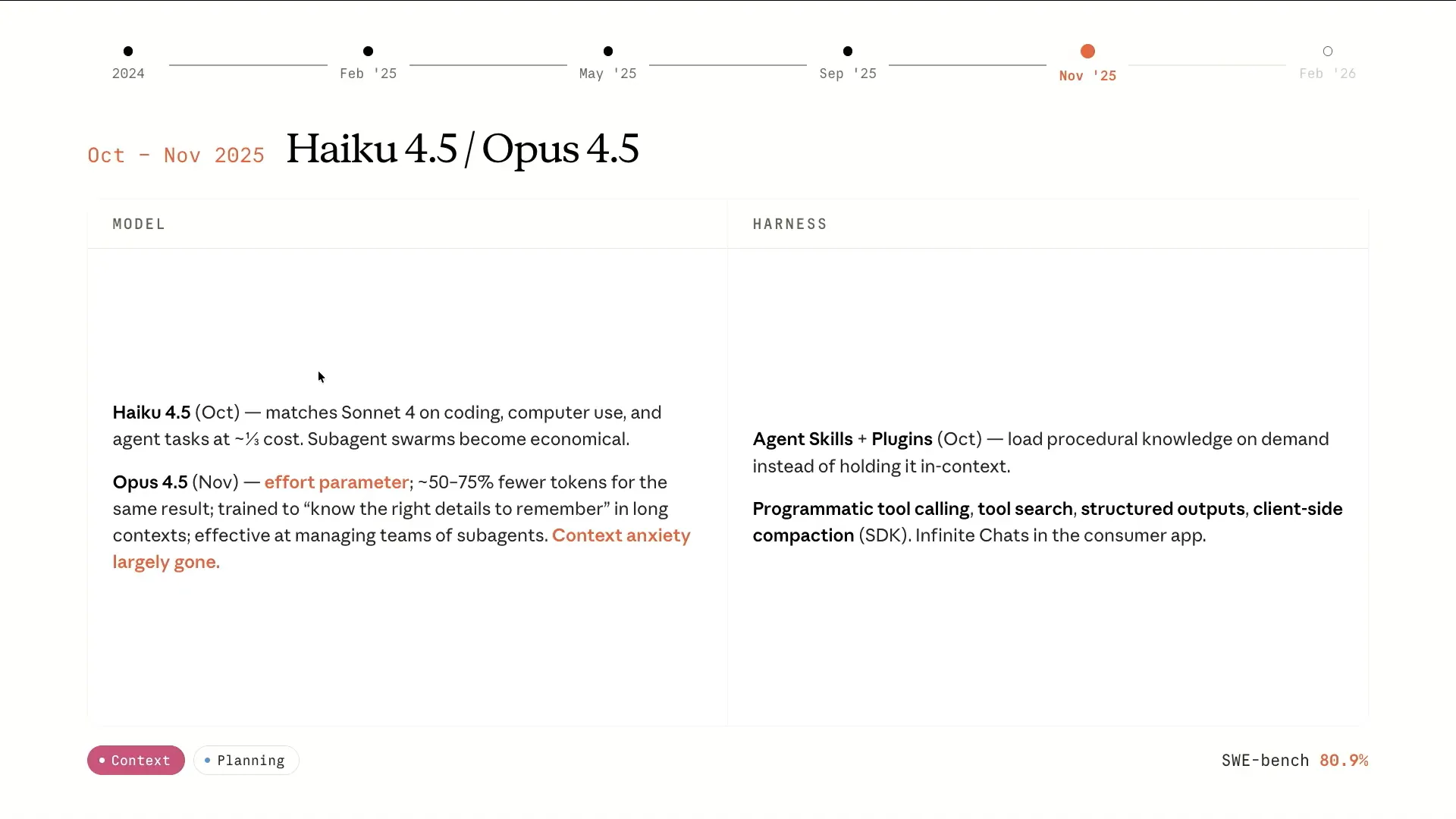 | Completing the family with Haiku 4.5 and Opus 4.5 made things particularly interesting. Running multiple sub-agents became economical, and Opus 4.5 excelled at planning. We began using Opus 4.5 for planning while leveraging Sonnet 4.5 as the primary executor for the code. This was also a significant period because we released Skills, which effectively utilized context through progressive disclosure. Only the front matter of the Skill is loaded initially, rather than all tool descriptions that can consume a large portion of the context window. The rest of the Skill's body is loaded upon instantiation, along with references to code that can run more deterministically. |
Slide 26 — 11:54 (watch)
 | More context improvements include programmatic tool calling. Instead of running multiple tools and pulling all that information into context for processing, we can write code on the fly to execute a series of tool calls and obtain the final result directly. This approach aims to enhance the efficiency of the context window usage. There is a lot to unpack on this slide. |
Slide 27 — 12:38 (watch)
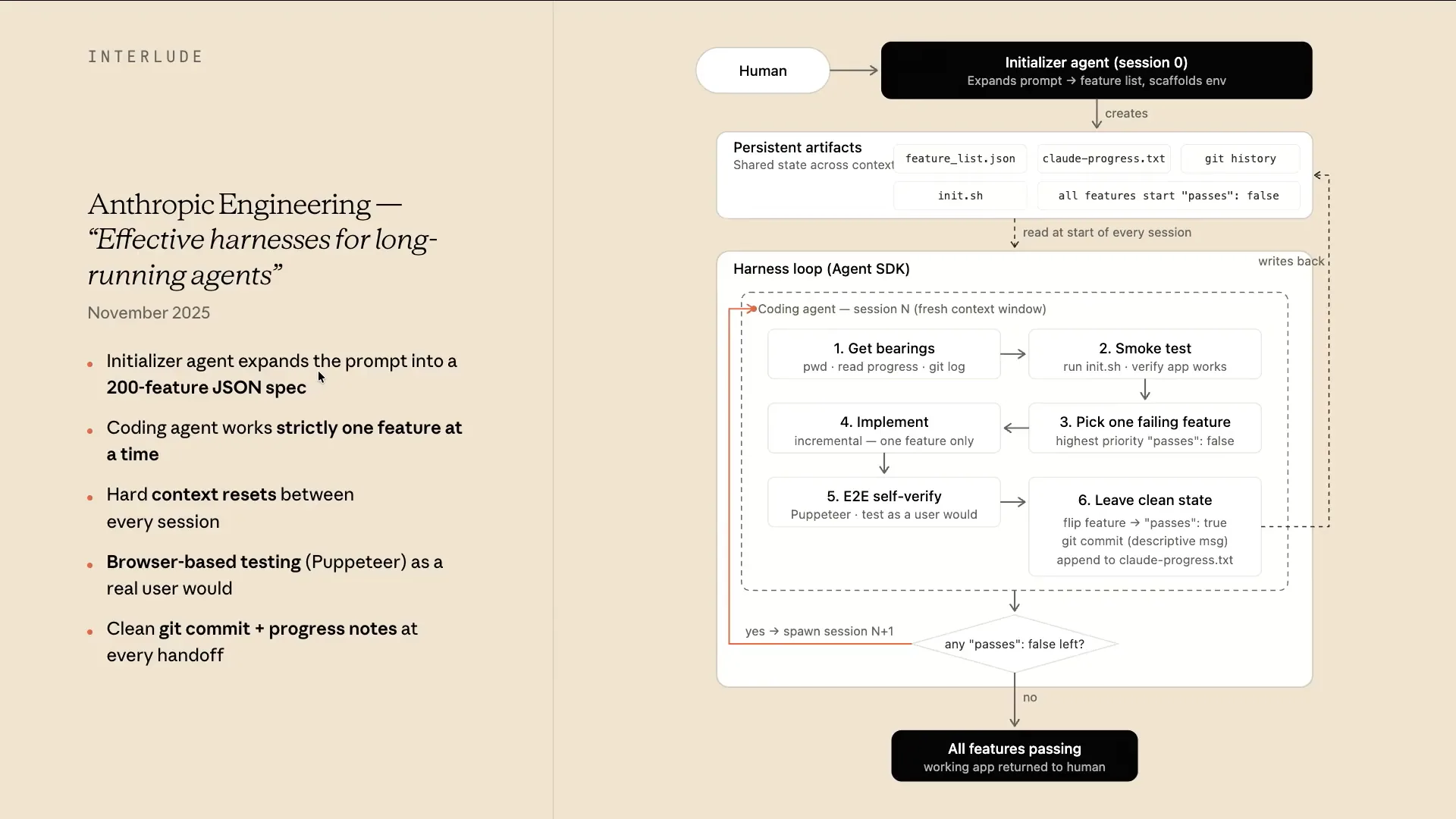 | In November, we released our first blog post on long-running agents and how to build them. Many of the concepts I've described should make this easy to understand. For example, if a human were to give a vague prompt like "write me a browser" or "create a Slack clone," the initializer agent in our harness would take that prompt and break it down into a series of persistent artifacts. The first artifact would be a feature list, saved as FeatureList.json. We found that models might overwrite markdown files, but they are less likely to overwrite JSON files, which is interesting. The initializer would also create a progress file, start a Git repository, build an init script, and include a flag to indicate whether the features are complete and pass all tests. |
Slide 28 — 13:12 (watch)
 | From there, it would enter a harness loop consisting of multiple steps. |
Slide 29 — 13:26 (watch)
 | The first step involves establishing a fresh context window to determine the present working directory and check the progress file. Next, a smoke test is performed by running the initialization script, which eliminates the need to figure out how to start the server each time. |
Slide 30 — 13:52 (watch)
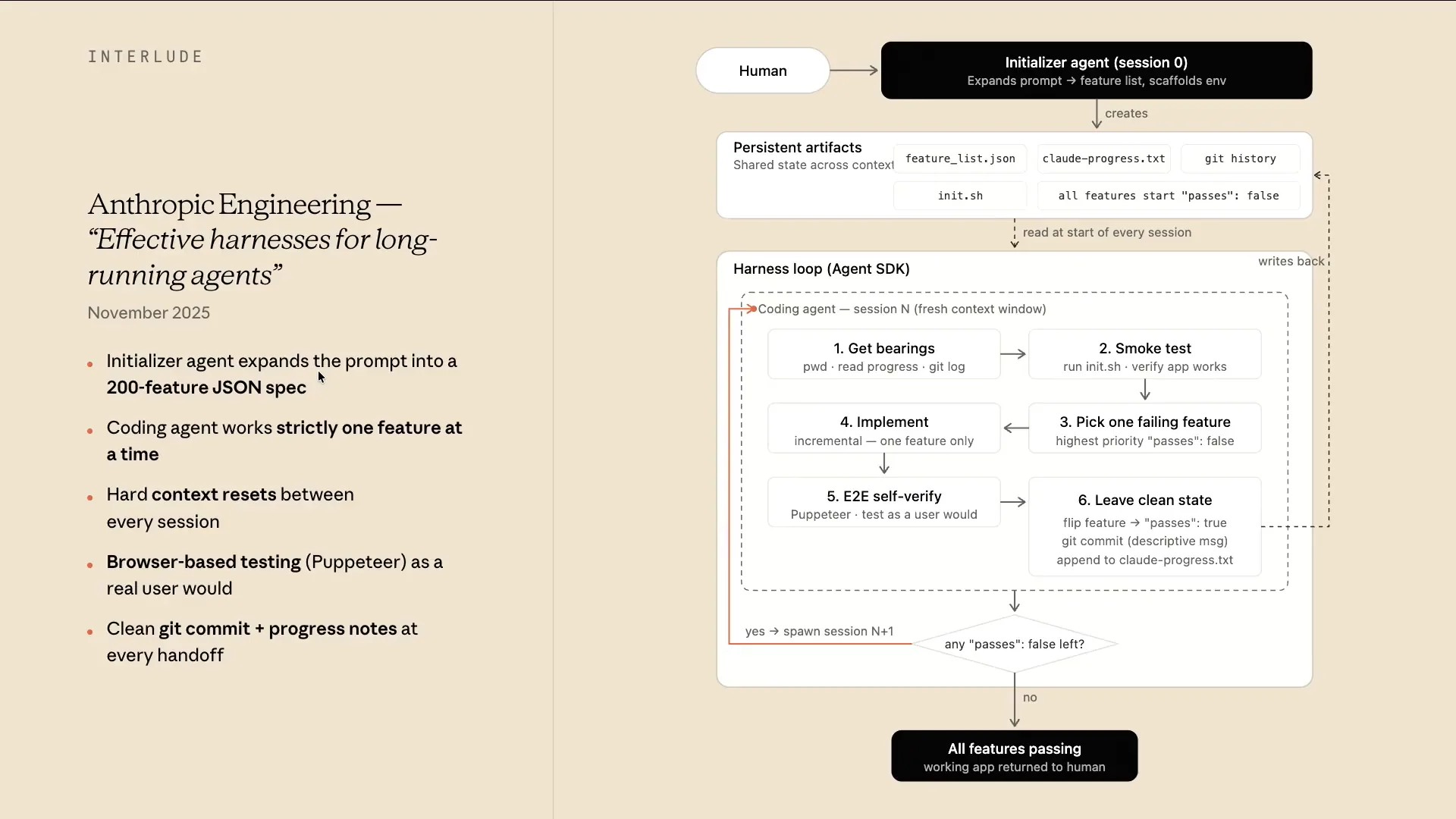 | Next, we focus on one feature that hasn't passed all tests. We implement that feature and conduct actual tests, creating a verification loop similar to what a human would do, using Puppeteer in this case. If everything passes, we write the Git commit and update the state of that feature to indicate it has passed. For any unfinished features, we continue the loop in a fresh context window. This approach allows us to layer in several concepts, such as fresh context windows, persistent artifacts, and verification loops, emphasizing the importance of thorough planning upfront. |
Slide 31 — 14:16 (watch)
 | This is the first iteration of the long-running harnesses. Continuing with the history tour, we have Opus 4.6 and Sonnet 4.6. |
Slide 32 — 14:58 (watch)
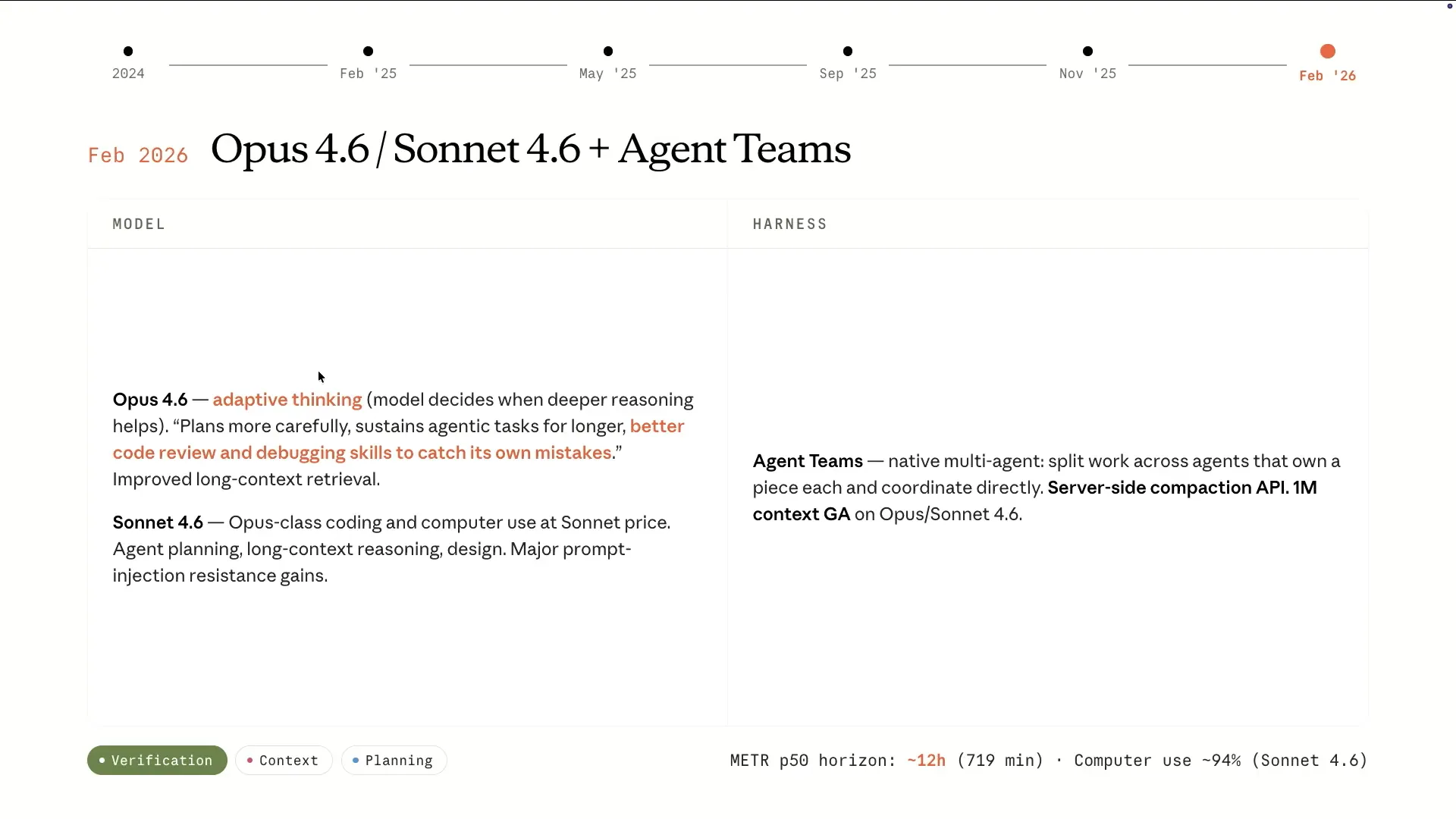 | Sonnet 4.6 provided Opus-level intelligence at a Sonnet price, becoming a workhorse for cloud code. Opus 4.6 excelled in planning, earning the label of an agentic model. It effectively determined which tools to use and could operate for extended periods, as demonstrated by the meter chart showing an increase from about four hours to 12 hours with a simple harness. This model is highly agentic. Additionally, we released agent teams, allowing users to scaffold custom agents in cloud code. The innovation of agent teams is that sub-agents can communicate with each other instead of reporting solely to the main agent, enabling them to coordinate and report back only when necessary. |
Slide 33 — 15:36 (watch)
 | We also introduced server-side compaction, which allows these models to run indefinitely while compaction occurs on the server side. This leads to a context size of 1 million. |
Slide 34 — 15:50 (watch)
 | We now have a single large context window. The models are improving, allowing for extended runs within a single context window rather than requiring new sessions frequently. This demonstrates how things evolve over time. |
Slide 35 — 16:00 (watch)
 | This slide provides an overview of the various releases displayed in the table. |
Slide 36 — 16:16 (watch)
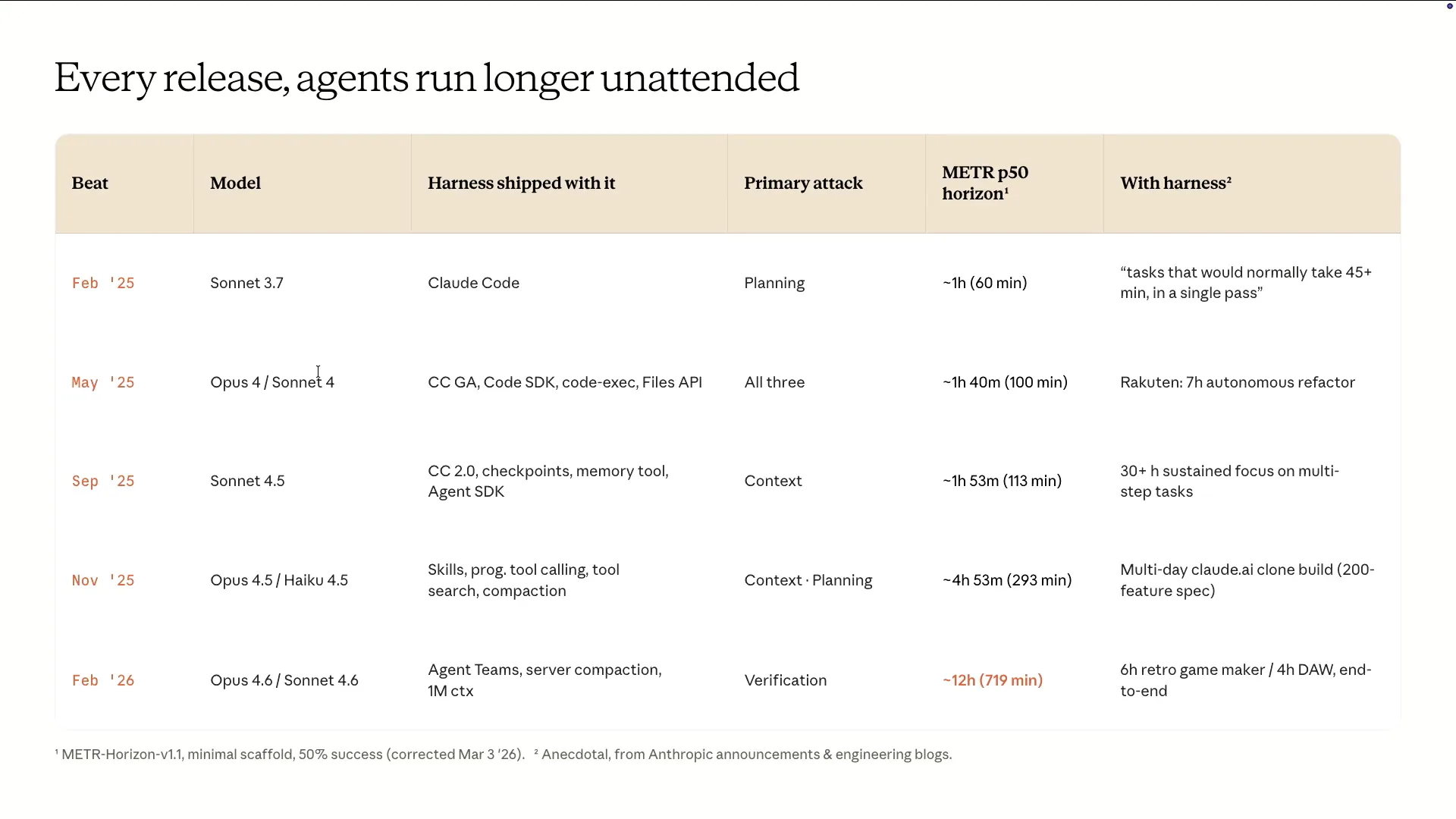 | You can see how the performance has improved from Sonnet 3.7, which ran for one hour, to Opus 4.6, which can run for twelve hours. We also have our own experiences to share; for example, tasks that took around 20 minutes with Opus 3.5 now allow us to build fully fledged applications that typically run for three to five hours instead of 30 hours. |
Slide 37 — 16:36 (watch)
 | You can build a fully featured application that runs out of the box. What's interesting is that the harness does not disappear as the models improve. |
Slide 38 — 16:46 (watch)
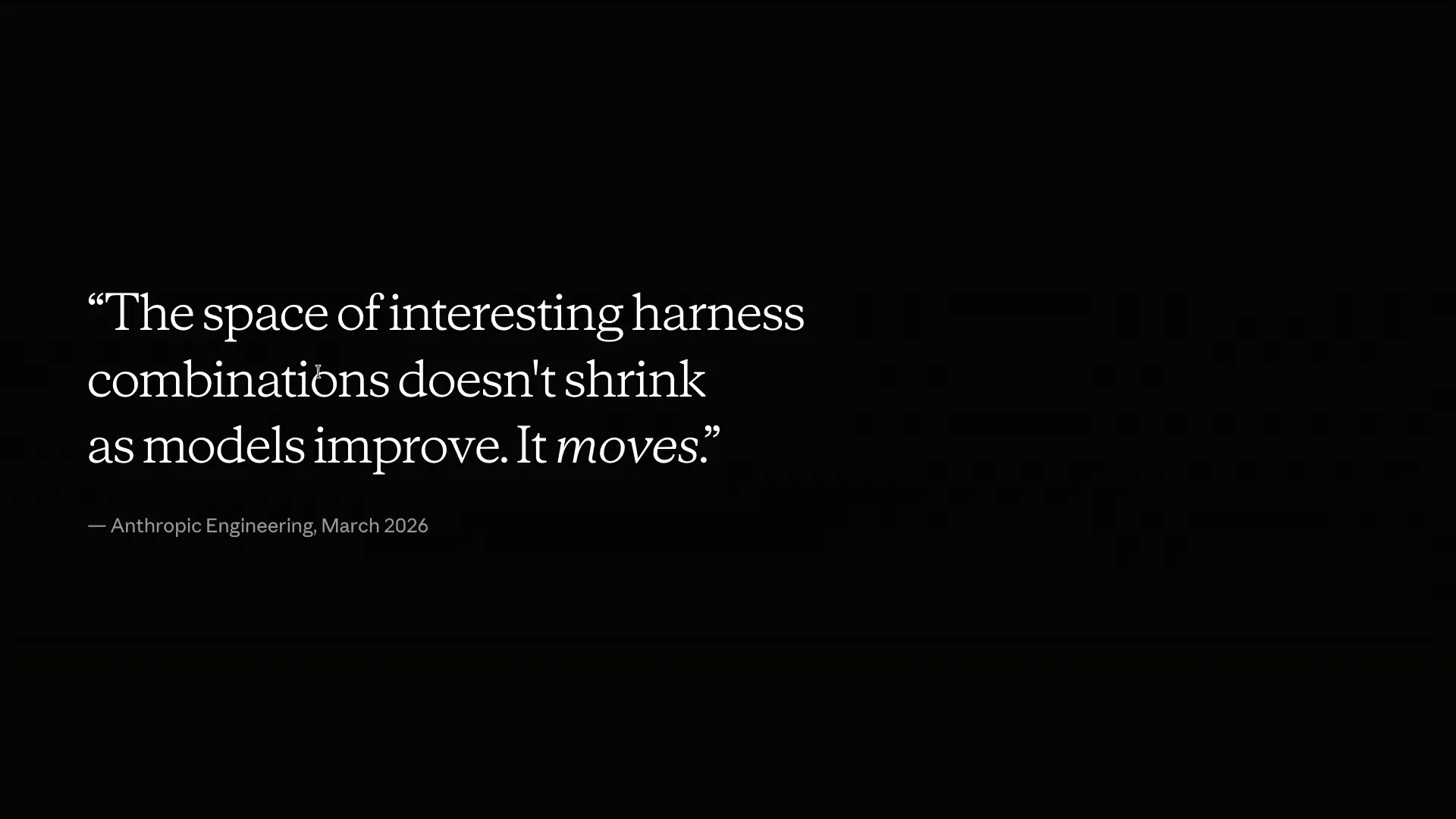 | The harness evolves alongside the models over time. It's fascinating to identify the gaps in the model and address them using the harness. |
Slide 39 — 16:58 (watch)
 | You train the model using that aspect of the harness, and at some point, you may remove it entirely. This iterative loop continues over time with more and more co-releases. |
Slide 40 — 17:08 (watch)
 | Hopefully, that overview of cloud evolution was an interesting perspective on its relevance to long-running agents. |
Slide 41 — 17:22 (watch)
 | I'll hand over to Ash to continue with the current state of the art. Quick question: how many of you have agents running in the background while you're here? |
Slide 42 — 17:56 (watch)
 | It seems that only a few of you are currently running agents in the background. By the end of this presentation, I hope you'll have some practical ideas to implement. As Andrew mentioned, the frontier of our field doesn't shrink; it simply moves. I want to discuss some straightforward harness patterns we've been experimenting with internally to create sophisticated one-shot demo applications. We're also exploring these concepts in post-training and reinforcement learning to enhance our models and their overall behaviors for more effective autonomous work. |
Slide 43 — 18:44 (watch)
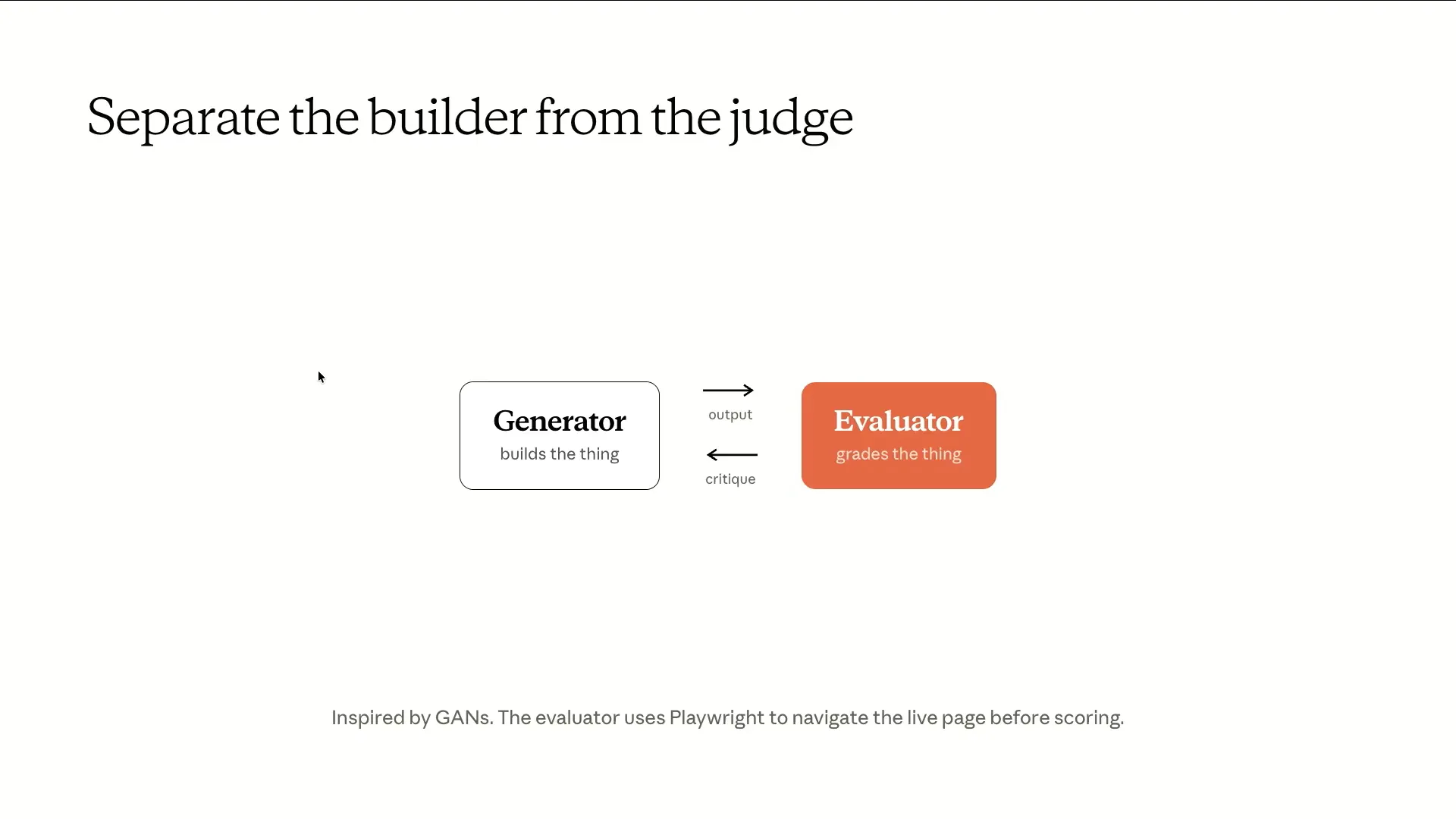 | If you've ever attempted to get an agent to review its own pull request, you'll understand the direction we're taking. This concept is inspired by Generative Adversarial Networks (GANs). In this framework, there is a generator model and a discriminator, creating adversarial pressure between the two. |
Slide 44 — 19:12 (watch)
 | The generator creates content, while the evaluator assesses it. The concept involves dividing the context, windows, system prompts, and tasks completely. |
Slide 45 — 19:24 (watch)
 | The evaluator does more than read diffs; it uses Playwright to open live pages, interact with them, and explore various functionalities. After this process, it returns its critiques to the generator, continuing the feedback loop. |
Slide 46 — 19:40 (watch)
 | Most people today use a single core code session, instructing it to check its own work and loop in that manner. This raises an obvious question: if the evaluator is also an LLM, why doesn't it simply rubber stamp the output? |
Slide 47 — 20:02 (watch)
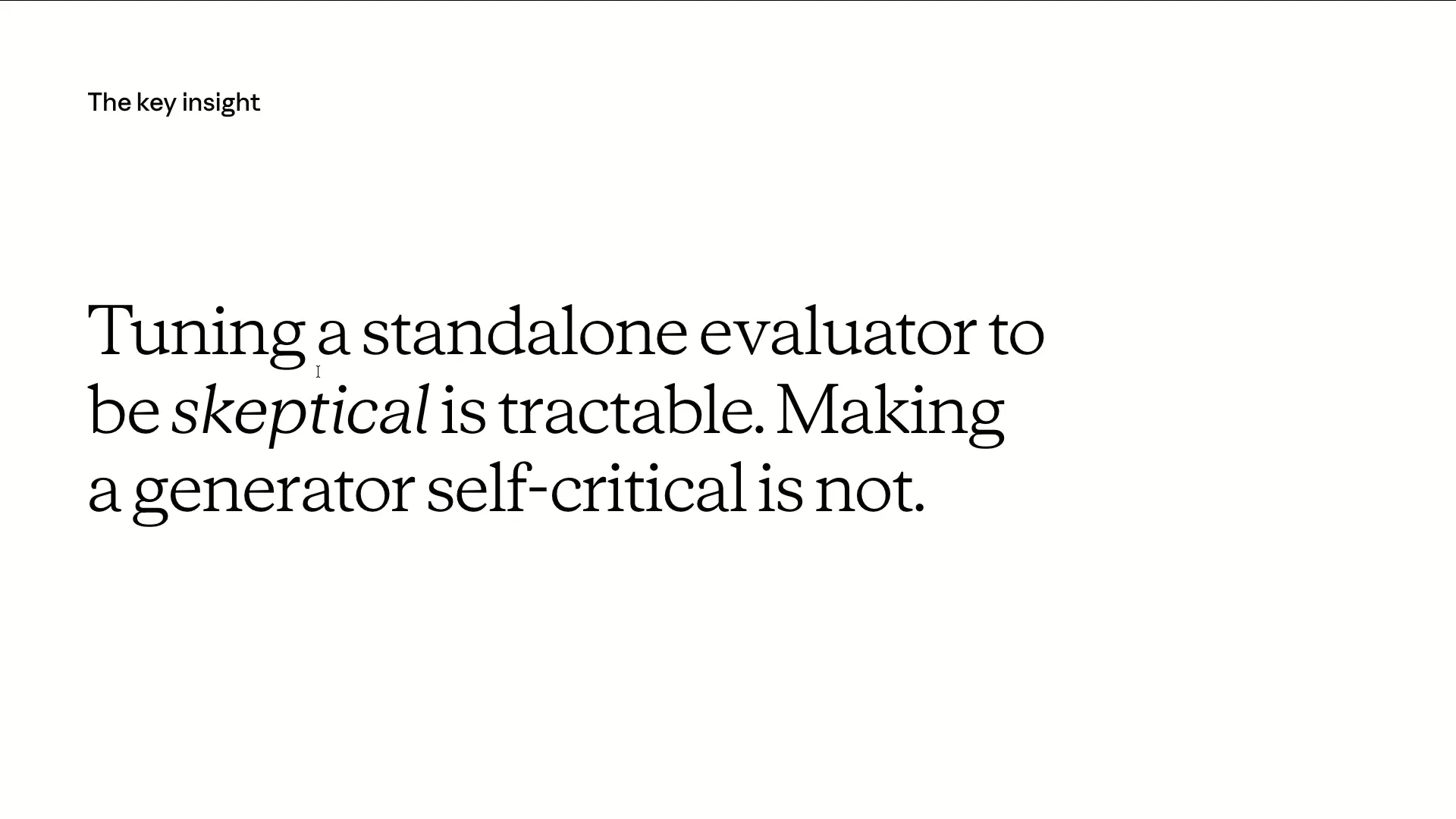 | The key idea we are exploiting is that while the evaluator is still a large language model and may be biased towards favoring large language model-style outputs, tuning a standalone critic to be harsh is quite tractable. In contrast, tuning a builder to be somewhat self-critical is much more challenging. |
Slide 48 — 20:44 (watch)
 | A good analogy for this is found in human behavior. It's easy to critique a beautiful piece of artwork or a fine meal, but much harder to create that artwork or cook that meal myself. We are exploiting the gap between an LLM's ability to serve as a critic versus its ability to generate content. Next, I want to discuss how to design these critics. The process is similar to creating effective evaluations, but in the context of full-stack applications, there are many nuanced factors that contribute to quality. It's not just about functionality; we also consider aesthetics, user experience, and the element of taste in these products. |
Slide 49 — 21:32 (watch)
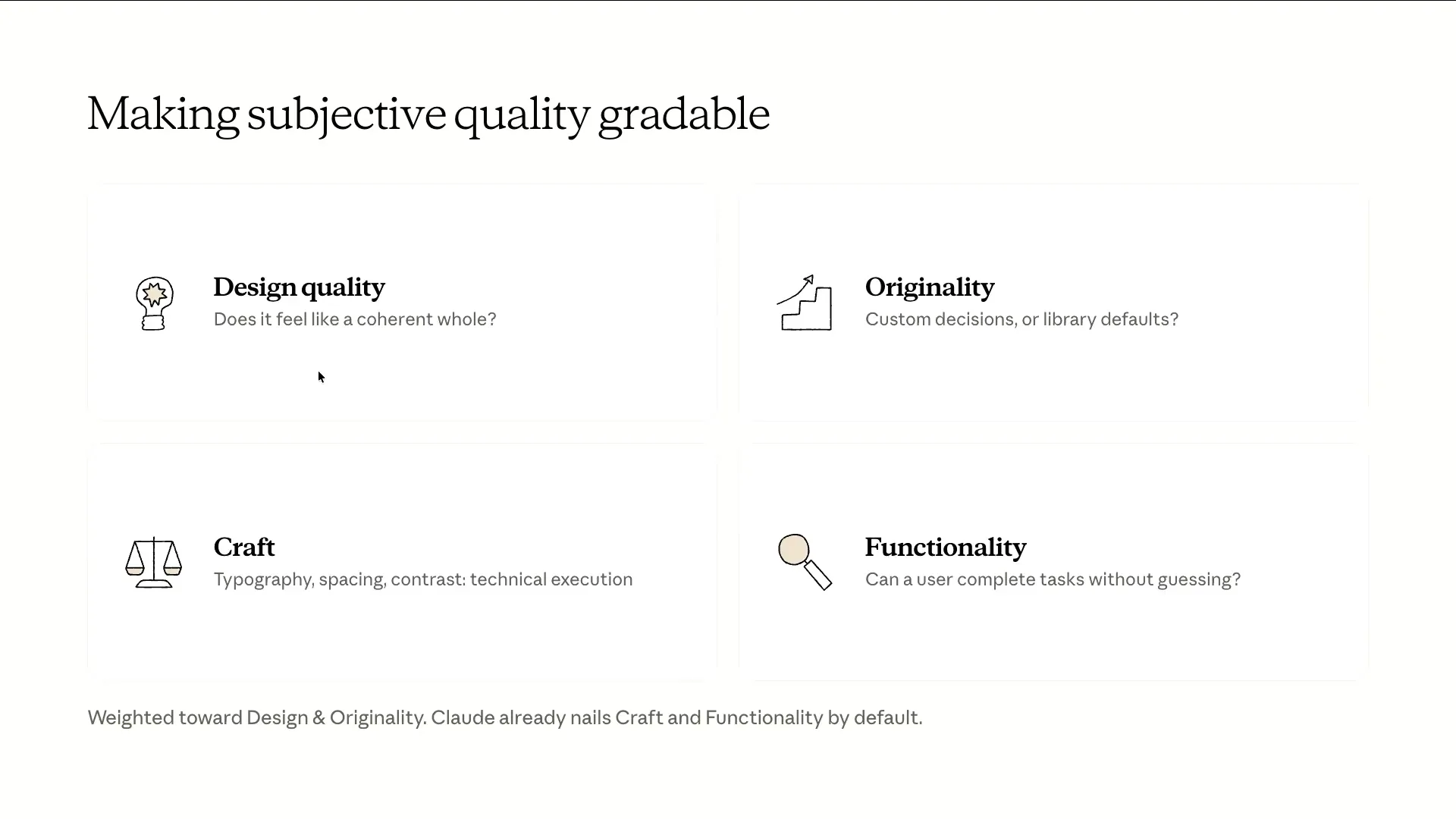 | We have been conducting extensive experimental work to imbue Claude with design taste during post-training and to enhance the front-end design skills of our models. While many believe taste cannot be graded, we argue that it can be assessed if you have a strong enough opinion and document it. Our approach involves creating a rubric based on four criteria: design, originality, craft, and functionality. |
Slide 50 — 22:10 (watch)
 | We weight our criteria towards design and originality, adjusting the emphasis based on the model in use. Currently, Opus 4.6 performs well in functionality, so our challenge is to avoid issues like purple gradients and general AI-generated aesthetics. We calibrate our evaluations with a few short examples from reference sites to align the evaluator's taste with our standards. Now, let me show you an example of how this process looks in practice. |
Slide 51 — 22:36 (watch)
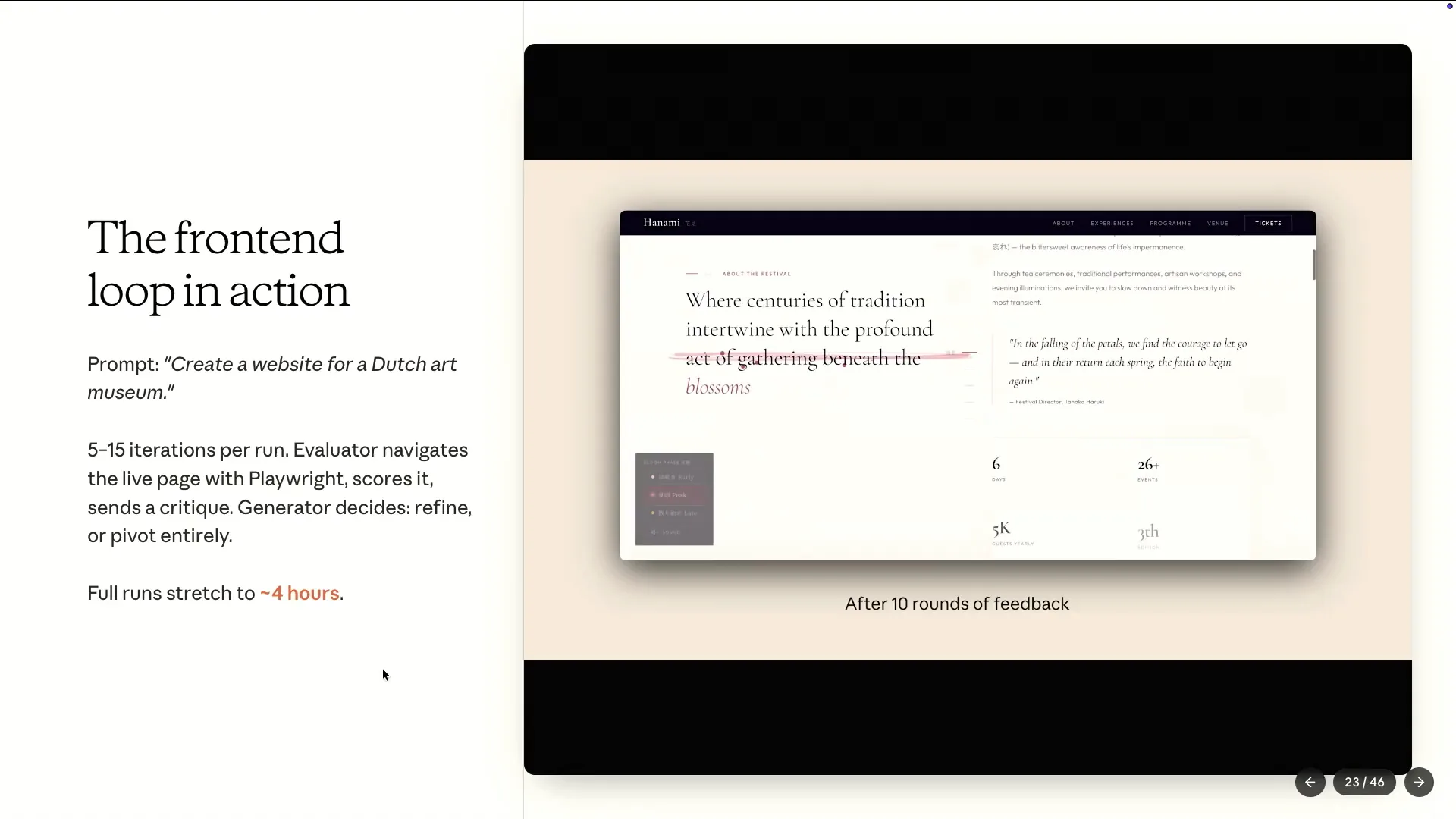 | This example illustrates a model using a loop generator. It launches Playwright, navigates through the site, takes screenshots, scores based on four criteria, writes a critique, and then returns to the generator. |
Slide 52 — 22:50 (watch)
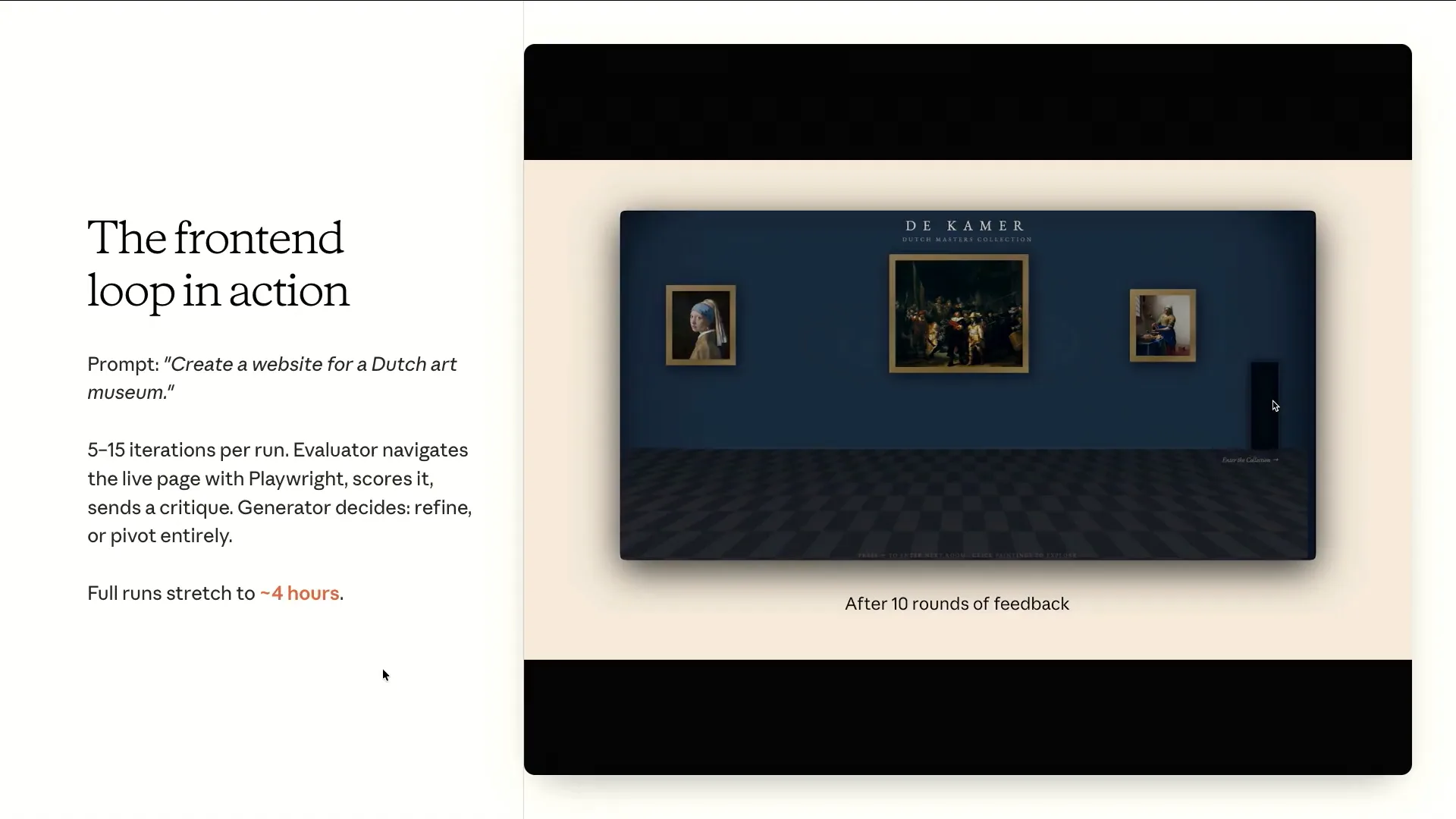 | All of these examples consist solely of HTML and CSS, which I have reviewed for about four to five hours, going through 15 rounds. |
Slide 53 — 23:06 (watch)
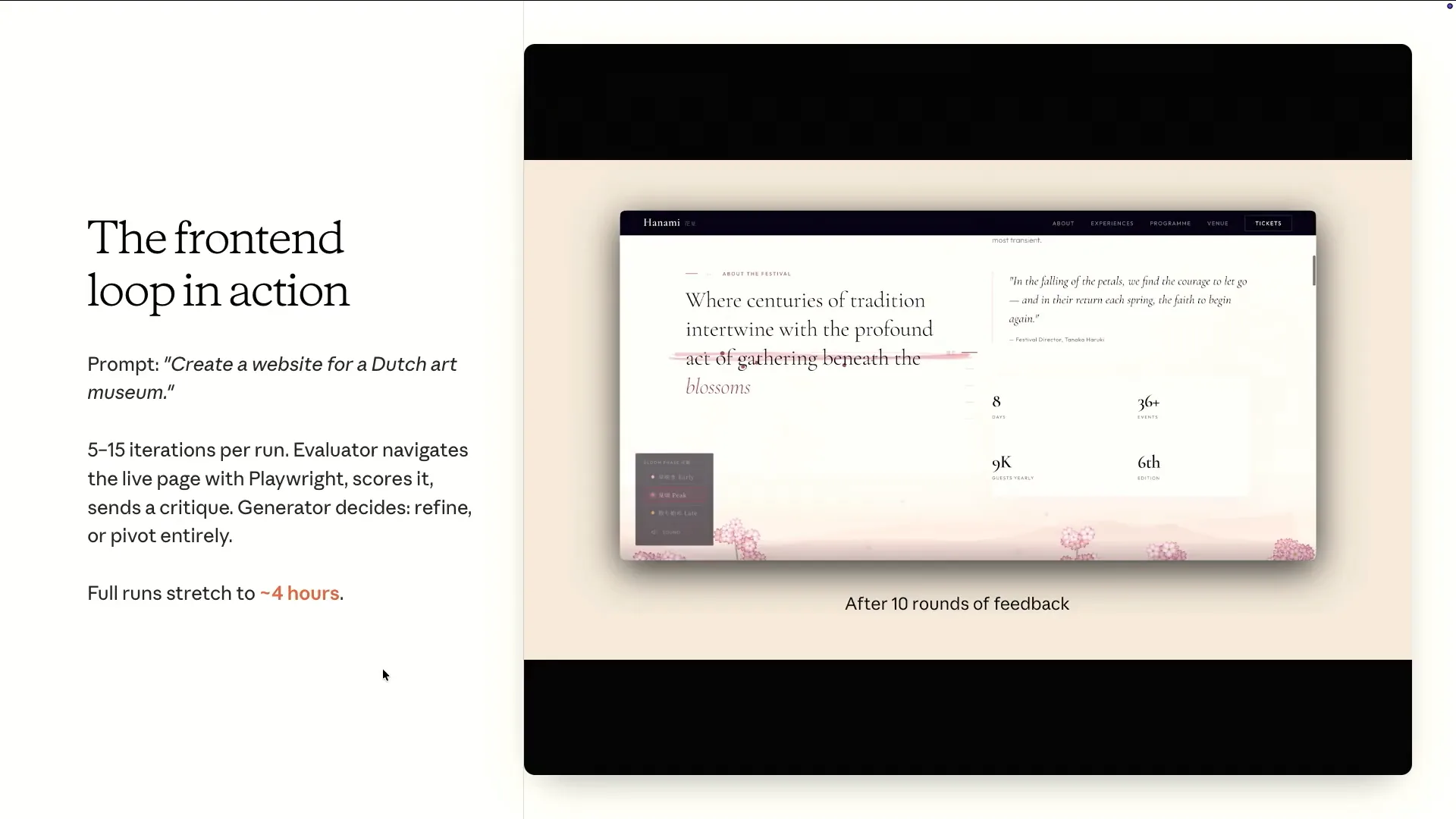 | An interesting aspect of this approach, which is quite unique and not typically found when using a single type of agent loop, is its ability to pivot. For instance, if the generator becomes stuck on one of the four criteria, it can adjust its focus. |
Slide 54 — 23:22 (watch)
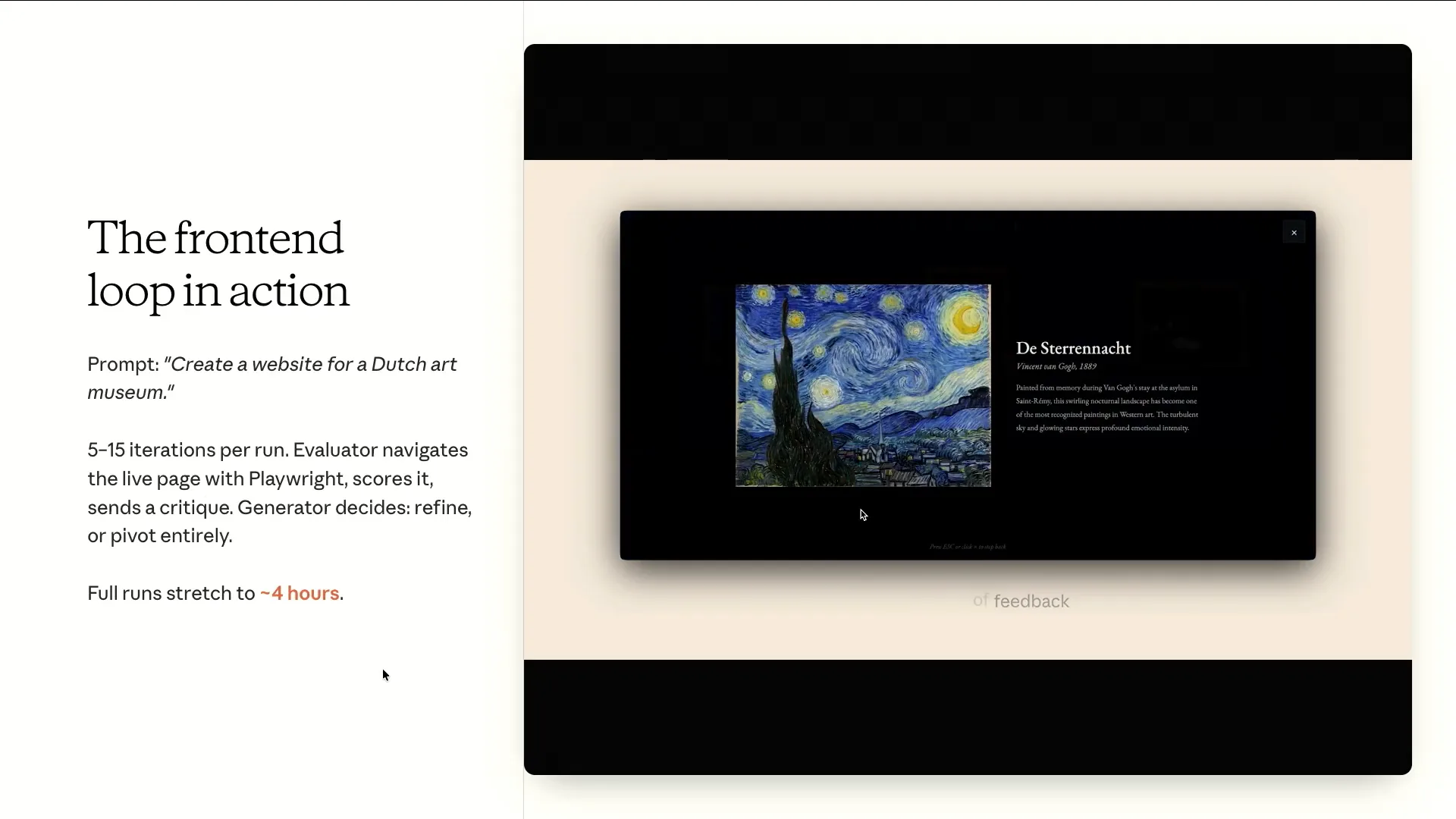 | If the generator struggles and consistently scores low on originality, the system will discard the entire attempt and start over from scratch. |
Slide 55 — 23:26 (watch)
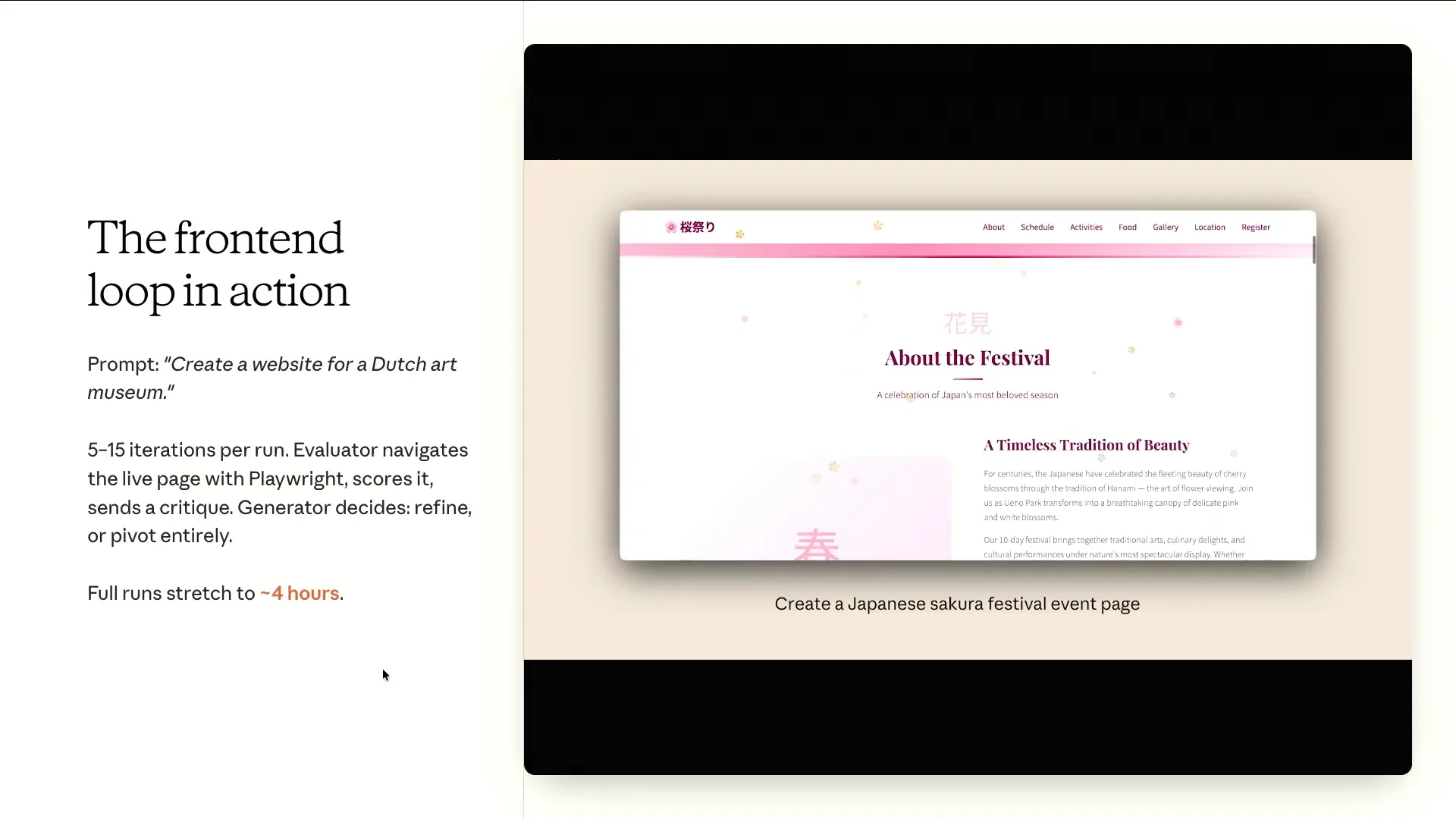 | The GAN-style harness we are using will discard the entire output and attempt to generate it from scratch. In contrast, a single-pass generation or a Ralph loop continuously tries to improve the same output. |
Slide 56 — 23:34 (watch)
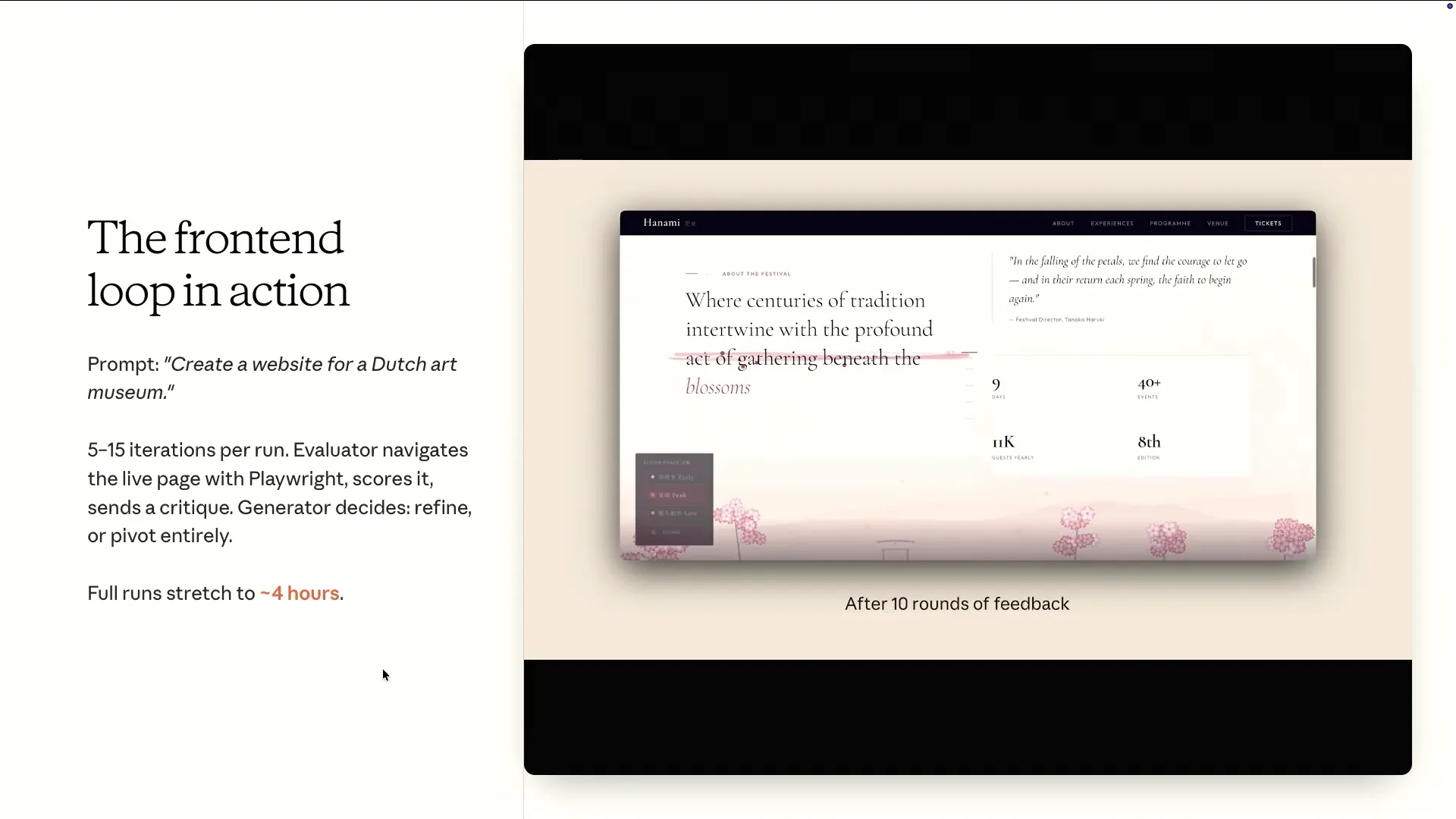 | This ability to course correct over long time horizons is unique to the process of breaking down different roles involved in building a project. |
Slide 57 — 23:54 (watch)
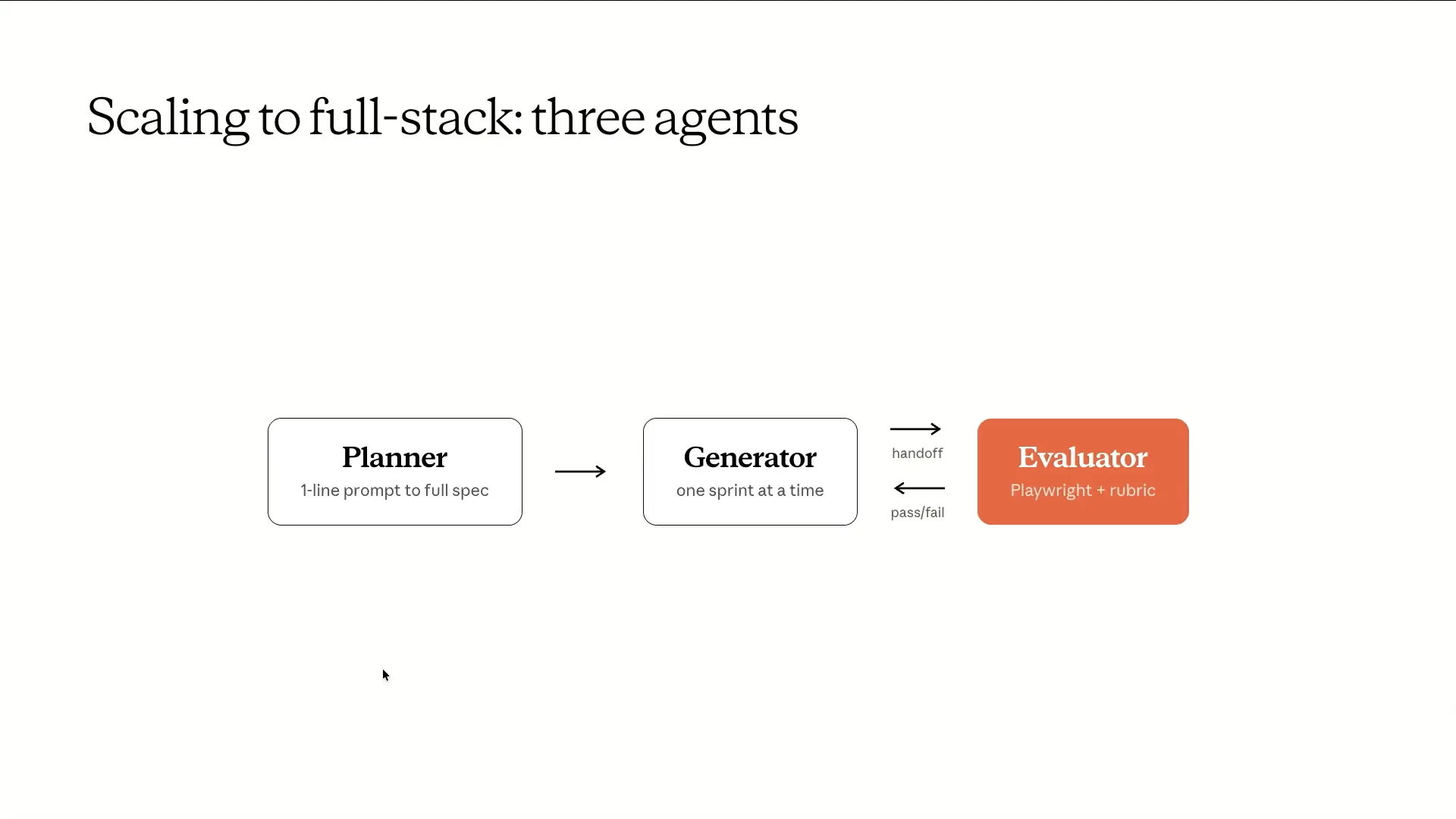 | That was an insight into our approach to the front-end component. To transition from visually appealing pages to fully functional applications, we introduced an additional role: the planner. This may seem straightforward. |
Slide 58 — 24:26 (watch)
 | The planner takes a one-line prompt and breaks it down into a high-level specification. It outlines the general workflow in a series of sprints. However, it does not plan the granular technical details of the product. This approach is beneficial because attempting to specify these details is likely to introduce errors. When errors occur, they can cascade through each sprint, magnifying issues over a multi-hour time horizon. |
Slide 59 — 24:52 (watch)
 | This slide presents a simple organizational structure involving product management, individual contributors, and quality assurance. |
Slide 60 — 25:02 (watch)
 | We didn't invent this concept; we simply provided each role with its own context window. An interesting aspect to discuss is the connection between the generator and the evaluator in this setup. |
Slide 61 — 25:38 (watch)
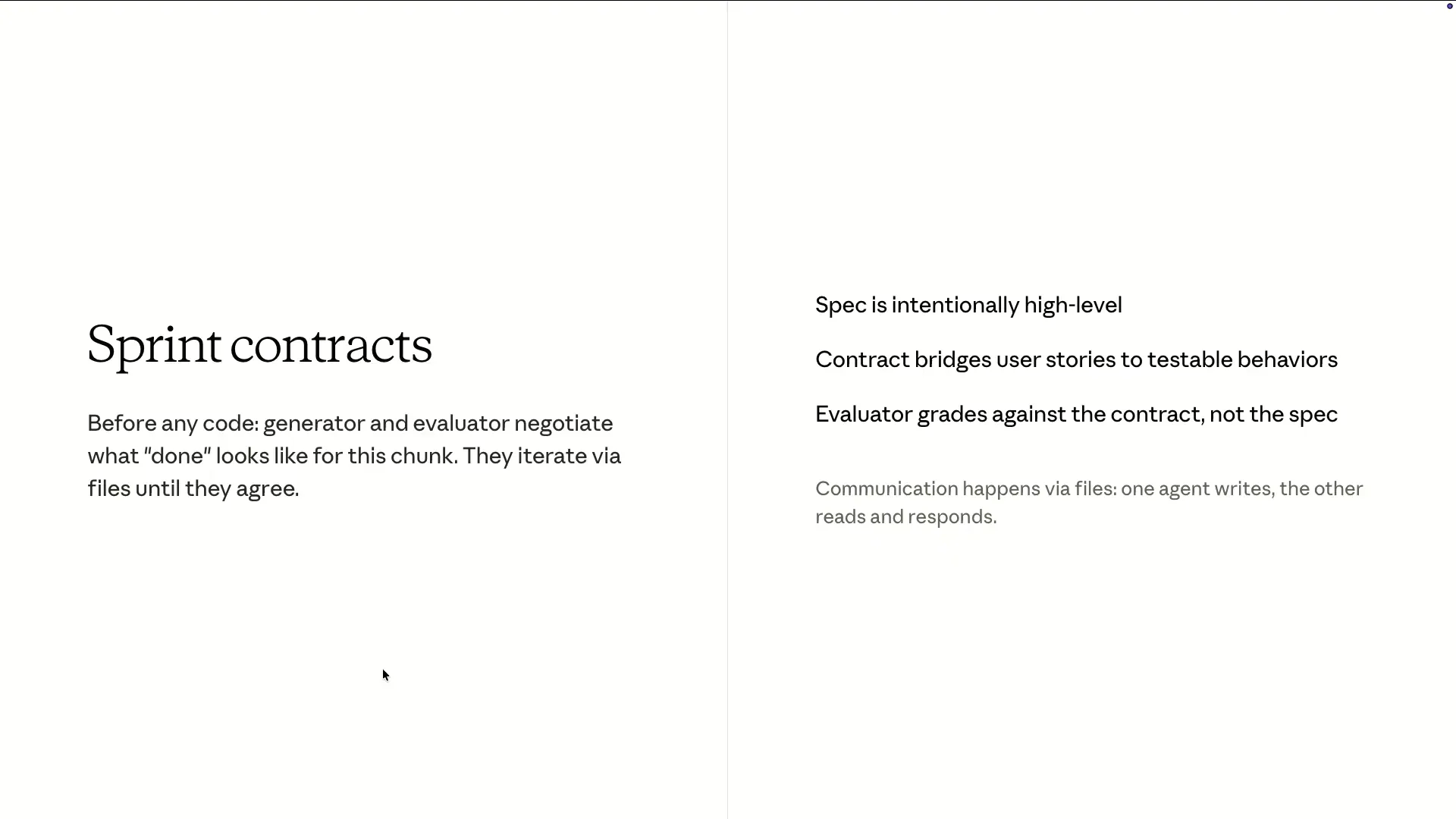 | Before the generator writes a single line, the two agents negotiate what "done" means. For example, if the generator proposes to build feature X and suggests verifying it by testing Y, the evaluator might respond that the scope is too large, the proposed tests are insufficient, and that certain edge cases have been overlooked. This negotiation occurs through files on disk, where one agent writes in markdown while the other reads it. They iterate until both agents reach an agreement, at which point they begin the actual building process. |
Slide 62 — 26:02 (watch)
 | The evaluator grades against the contract that the two agents have established, rather than the original specification that the planner created at the beginning. |
Slide 63 — 26:34 (watch)
 | This matters because it bridges the concept of user stories, or specifications, and converts them into more tangible, testable assertions—essentially a contract—without requiring the planner to over-specify upfront. This represents a key innovation that the RALF loop lacked. The RALF loop relied on a fixed plan, but there was no engagement with the main loop from the other side. This approach also emphasizes the importance of separate context windows and adversarial pressure. Now, let me show you an example of a very simple prompt we used in a solo loop compared to the harness we just discussed. |
Slide 64 — 27:16 (watch)
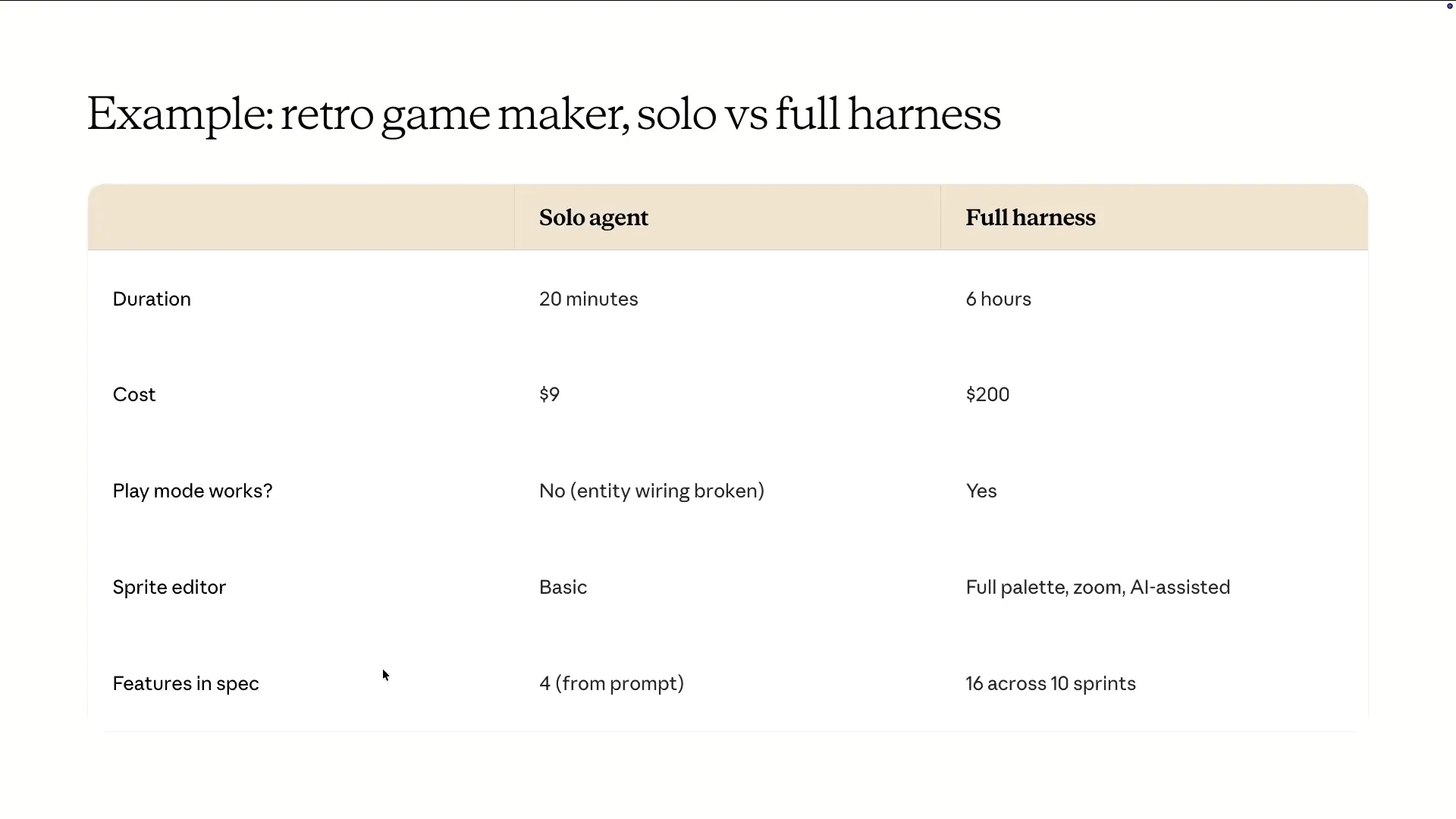 | The prompt was to build a retro game maker. I won't argue that this is the most cost-effective or efficient way to develop an app. Currently, it takes an excessively long time and is very expensive. |
Slide 65 — 27:36 (watch)
 | A lot of the functionality only starts working with this harness, which did not function properly in a solo loop. This is what the opening screen looked like when we did not have the harness. |
Slide 66 — 27:50 (watch)
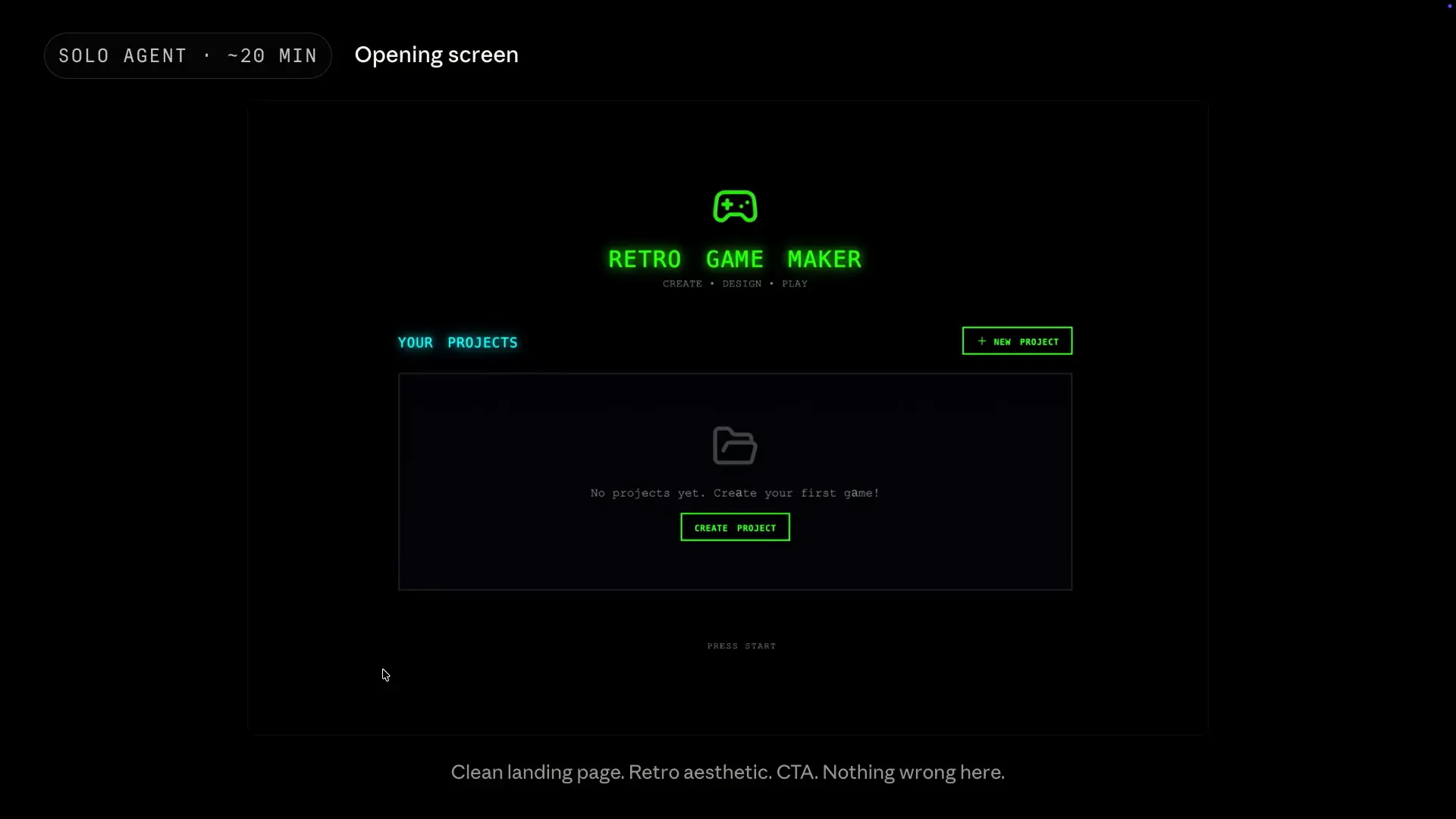 | The opening screen is quite simplistic and a bit boring, but it still looks nice. If this were the entire app, you might consider shipping it, but it serves more as a bait, so to speak. |
Slide 67 — 28:06 (watch)
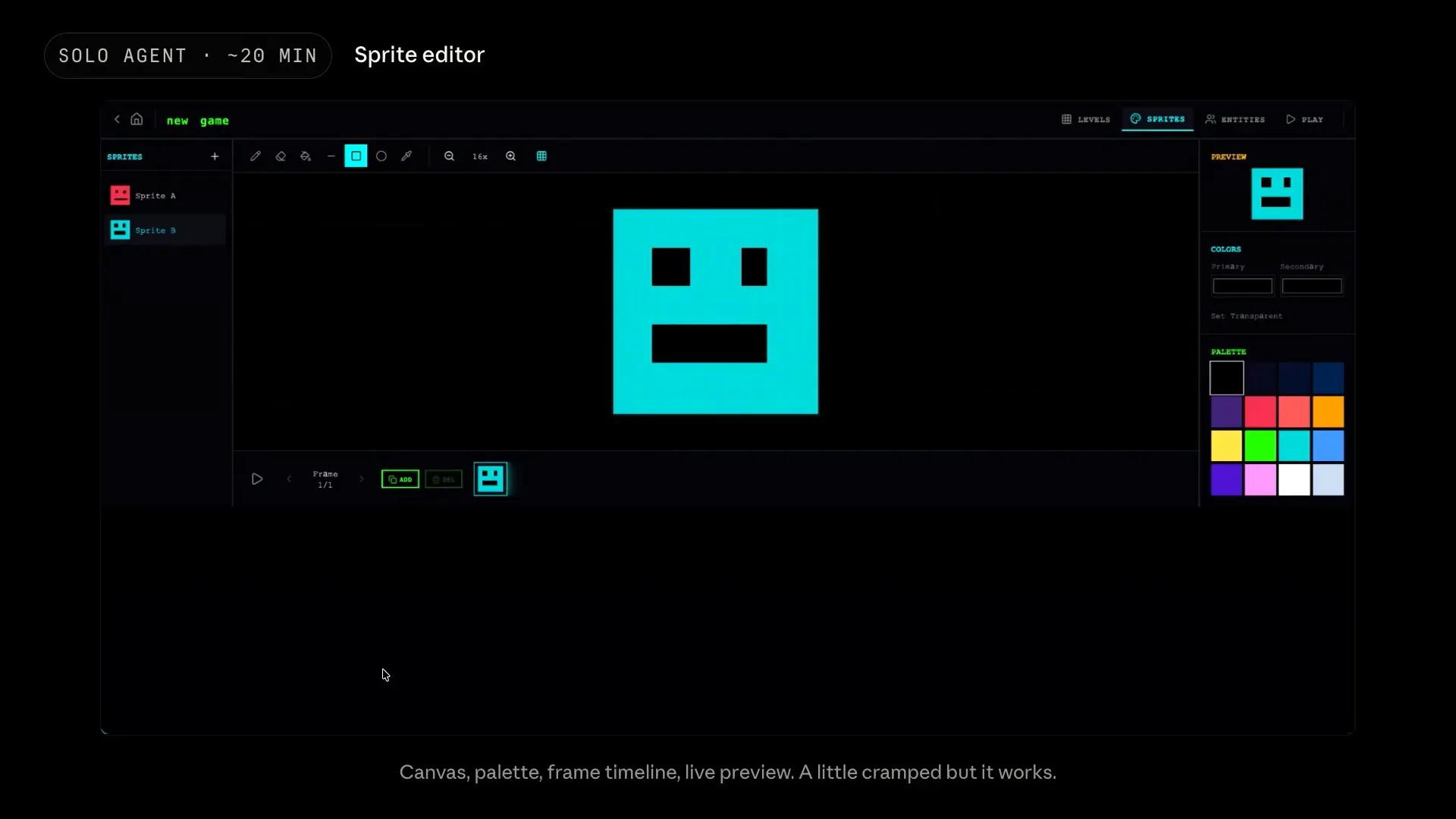 | This is the sprite editor. It includes the canvas, palette, frame timeline, and live preview. While it may feel a bit cramped and the color picker only shows black swatches, it functions as intended. The agent clearly understood its purpose. |
Slide 68 — 28:28 (watch)
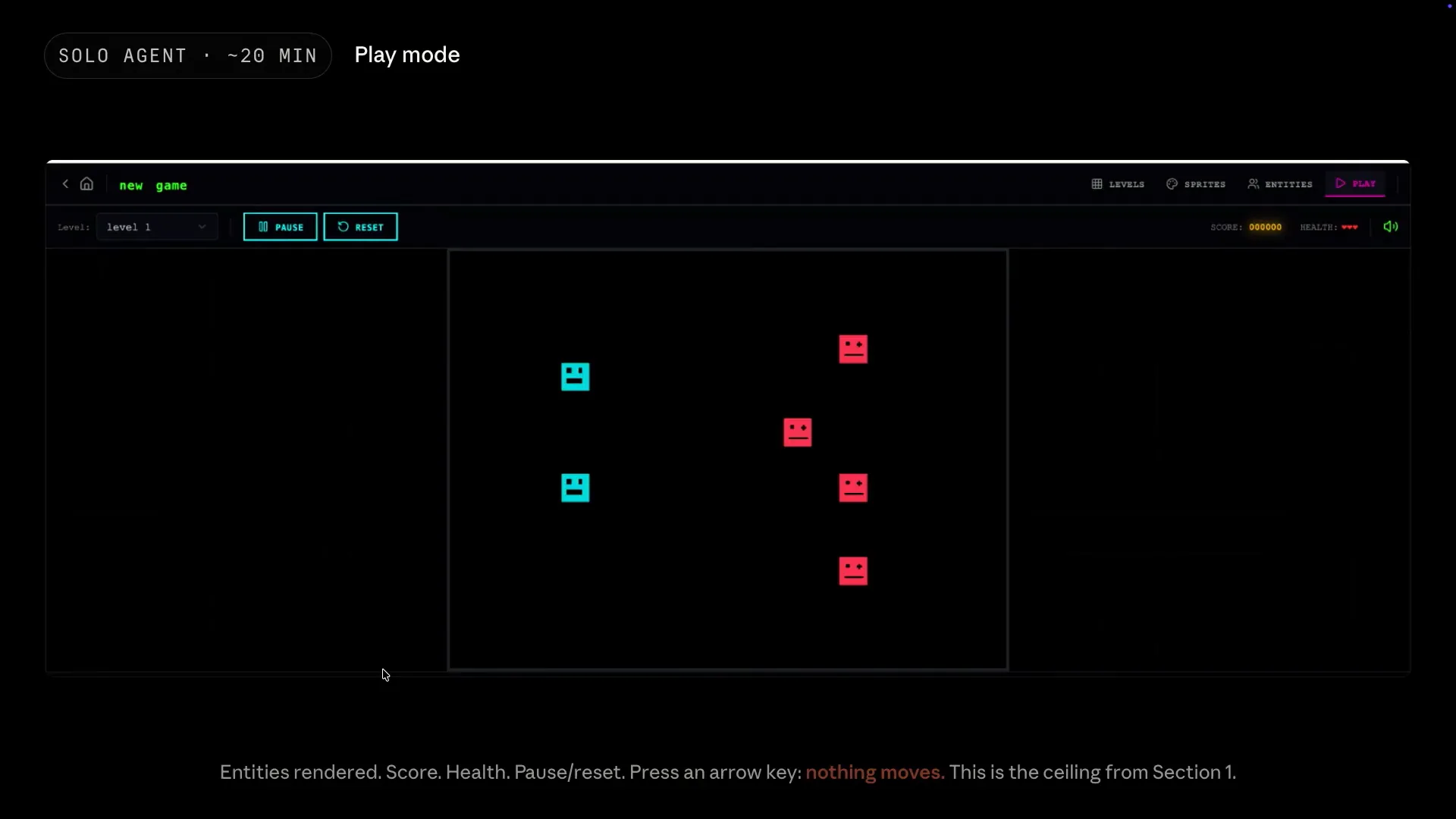 | The app's primary function is play mode, where entities are rendered along with the score, health, and other elements essential for a game. However, pressing the arrow keys has no effect, and the space key also does nothing. |
Slide 69 — 28:48 (watch)
 | The agent lacked the ability to test itself and understand what it meant to play a game successfully. Although it appeared complete at first glance, it ultimately failed when pushed to its limits. |
Slide 70 — 29:08 (watch)
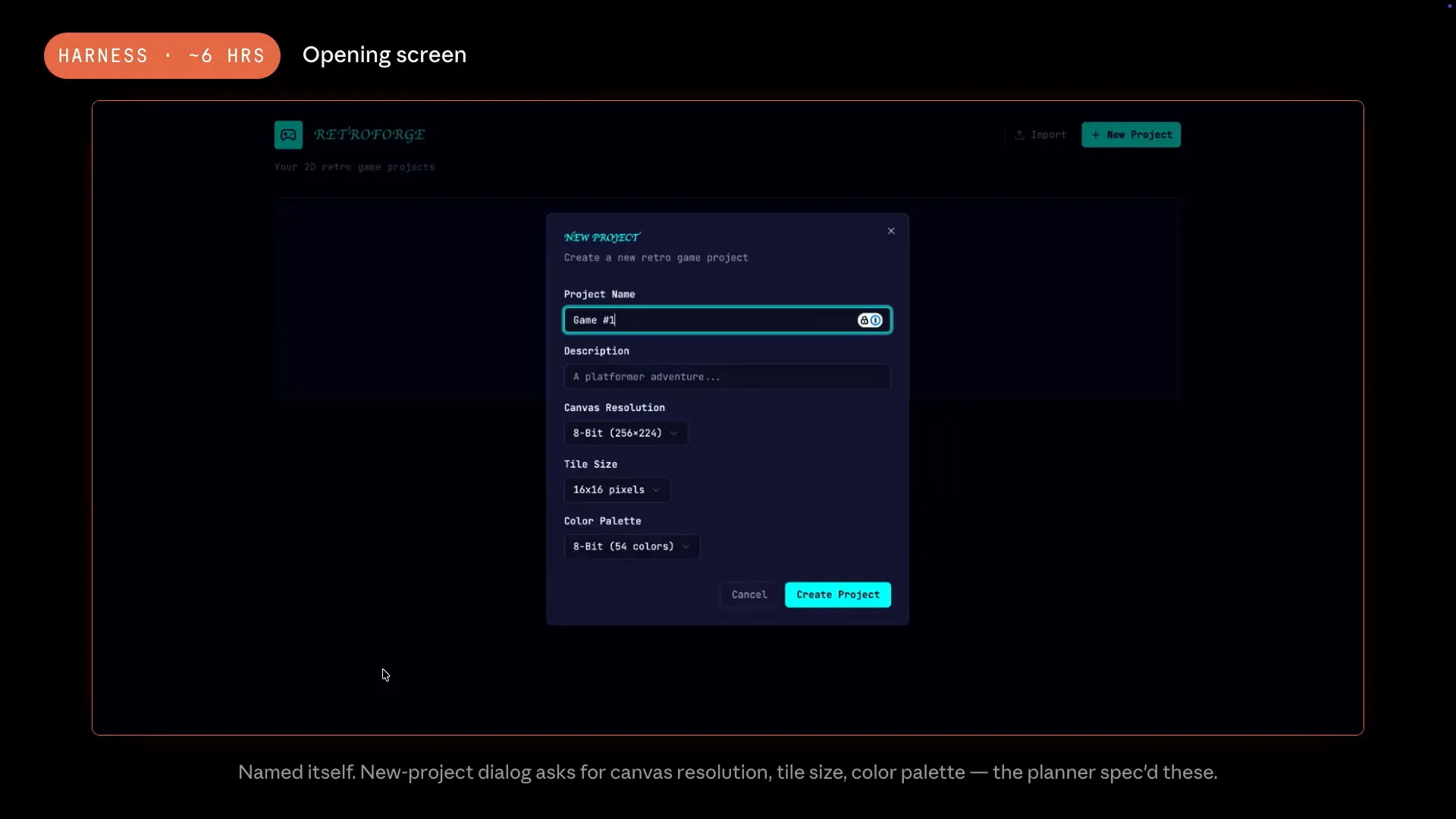 | When we ran the same prompt with the same model, the results from the harness were interesting. The process took about $200 and six hours. Initially, it named itself RetroForge and created a new project dialogue, complete with a visually appealing canvas, none of which was included in our prompt. |
Slide 71 — 29:24 (watch)
 | The planner made all the product decisions, while the two other agents determined how to test the product. |
Slide 72 — 29:40 (watch)
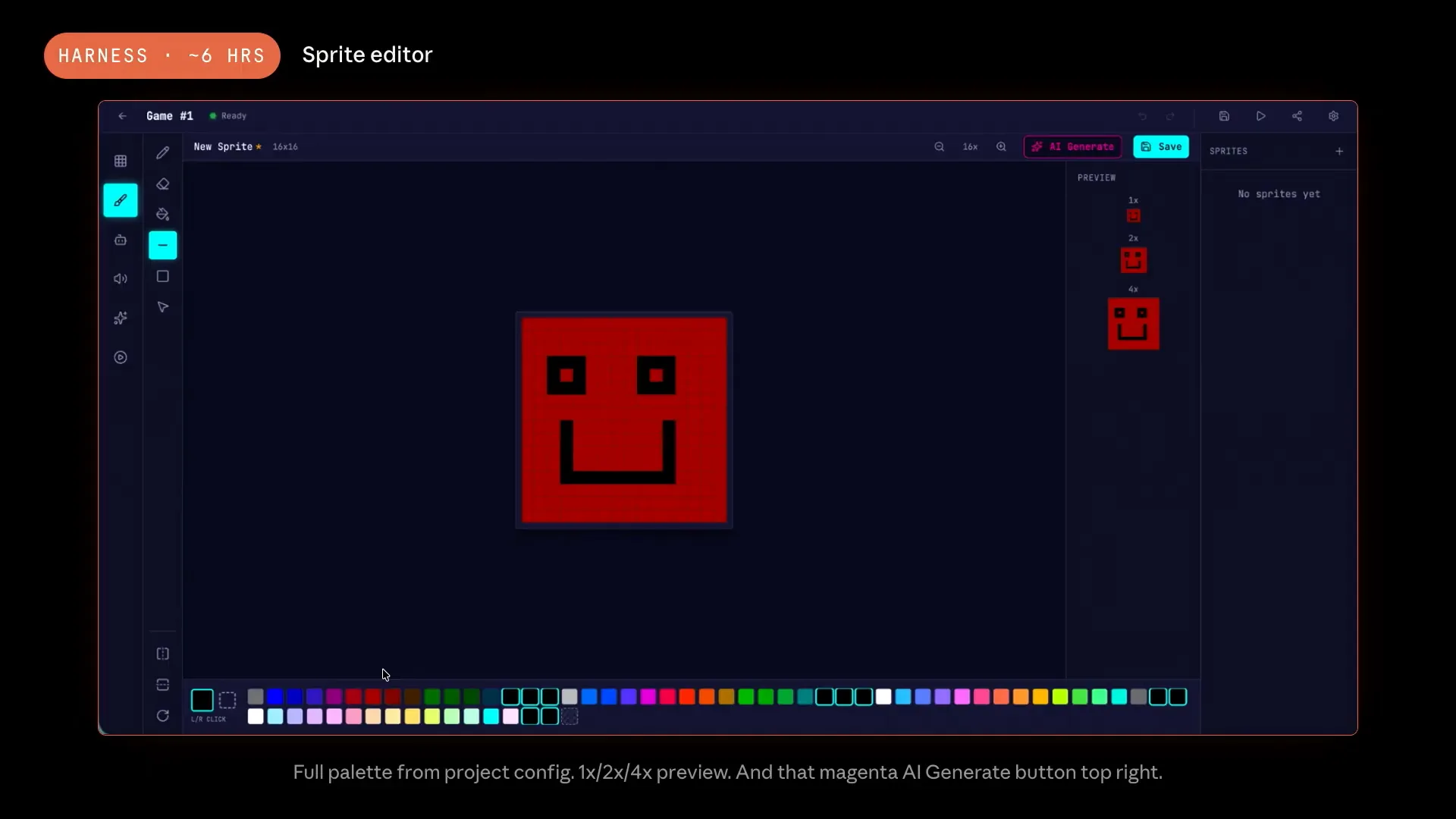 | In the sprite editor, we have a complete 54-color palette, featuring the 8-bit preset from the project dialogue. The sprite is displayed at the actual game scale. |
Slide 73 — 29:58 (watch)
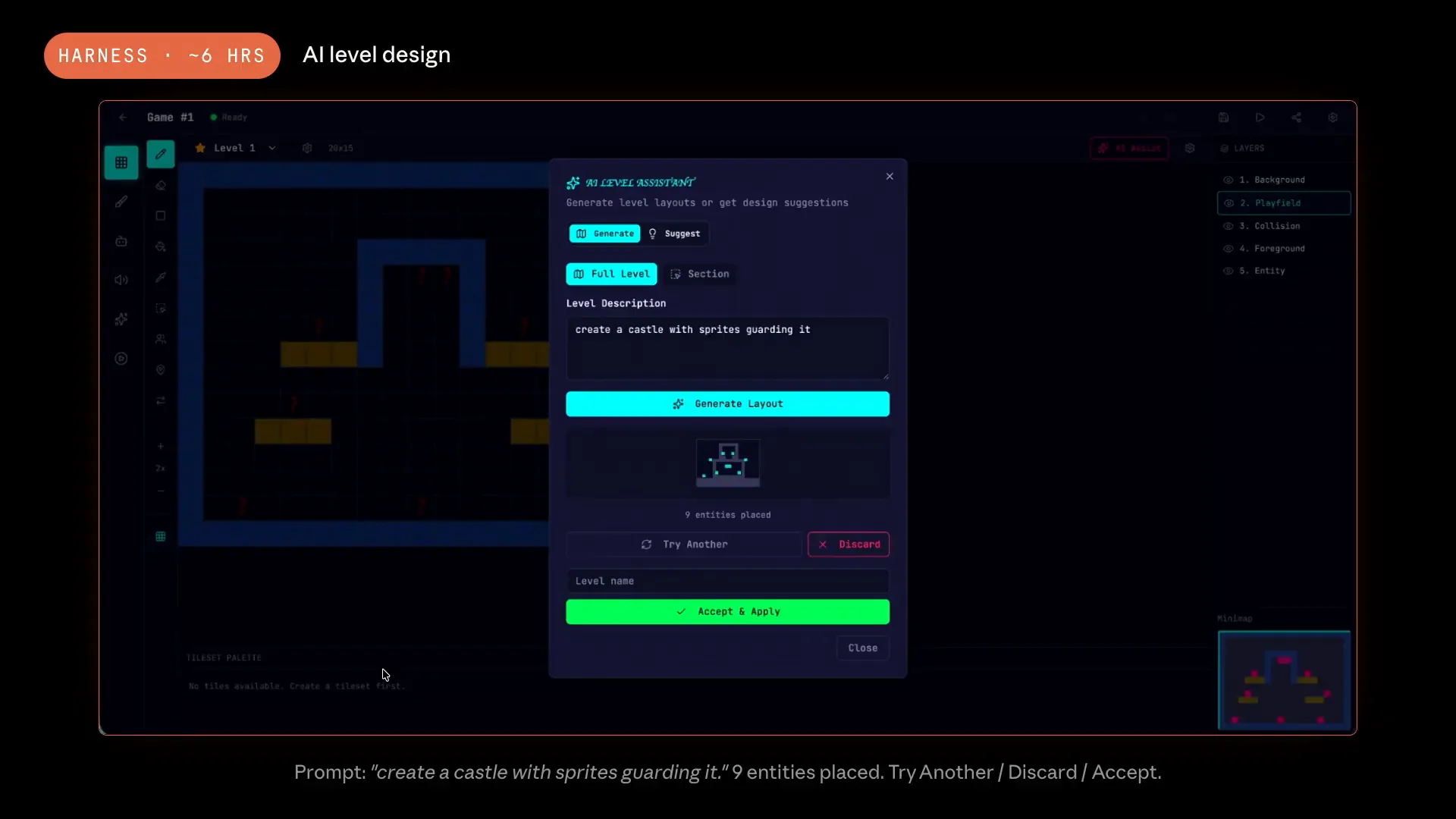 | The product is now much more complete overall. We introduced a new AI-level assistant, which marked the beginning of a recursive process. The planner determined that we should include some AI features, which was only a vague line in the specification. |
Slide 74 — 30:20 (watch)
 | The Harness transformed that vague idea into a fully functional AI-level assistant within the app. For example, a user could request to create a castle with sprites guarding it. This type of task would never be considered in a solo run; the other planner would not even register that request as a work item. |
Slide 75 — 30:34 (watch)
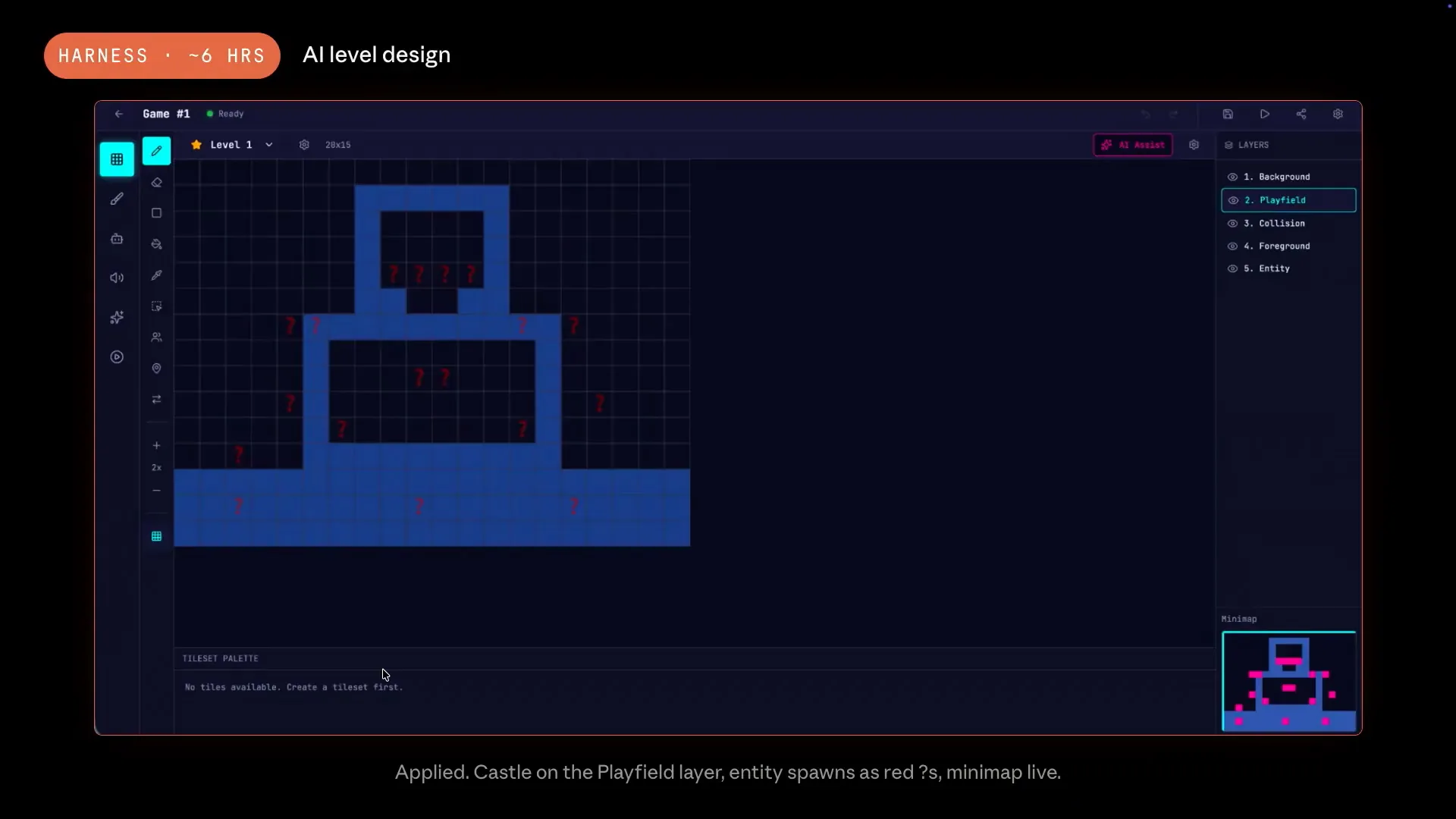 | Finally, the actual results were applied. |
Slide 76 — 30:54 (watch)
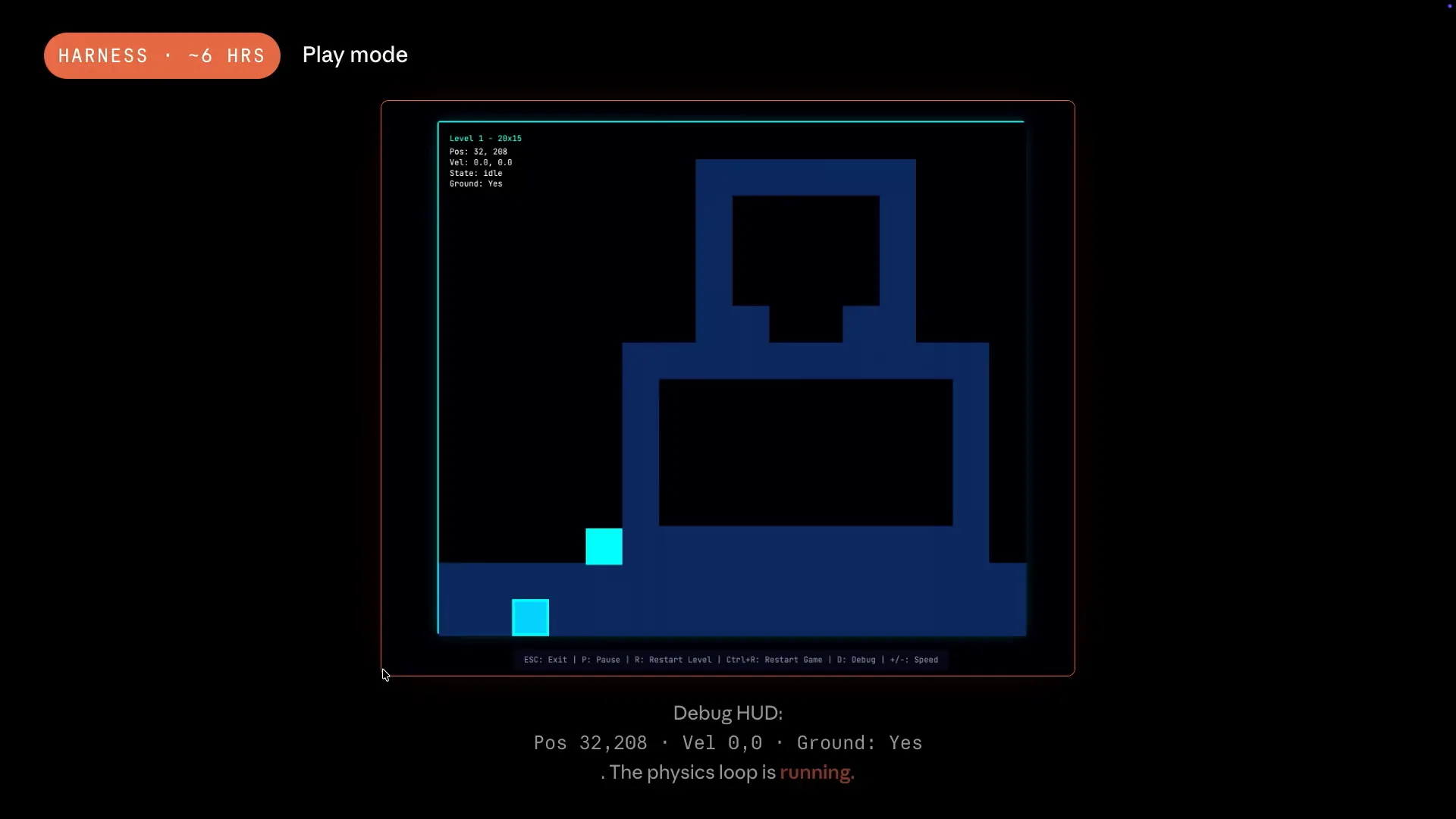 | Play modes include a debug HUD in the top left corner, designed to assist the evaluator. The displayed numbers are live, and the physics loop is actively running. The arrow keys allow the player to move and collide with castle walls. The evaluator launched the game and tested it, understanding which features needed to be assessed for the game to be realistic and successful. The difference between this output and the previous one is solely due to scaffolding. While the loop is quite simple, the results are significantly different. |
Slide 77 — 31:58 (watch)
 | The evaluator identified several basic issues, such as FastAPI route ordering, which can pass all unit tests but may fail in production. It also caught a Boolean logic bug related to the delete key. These problems were only detected because the evaluator interacted with the application. While such issues might slip through continuous integration in a rapid development loop, the specificity of these findings was intentional. The models are now capable of this level of detail. We discussed the contracts that the generator and evaluator establish; for this app, there were 27 contract criteria. This granularity is essential for making findings actionable. Vague criteria lead to vague critiques, allowing the generator to overlook necessary fixes. In contrast, granular criteria enable the agent to identify and correct specific lines of code. |
Slide 78 — 33:16 (watch)
 | Interestingly, Claude, out of the box, performs poorly as a general QA agent. Andrew mentioned this earlier. The sycophancy and generosity bias present in judged systems affect Claude as well. In early runs, the QA agent would identify a bug and suggest fixing it later, often taking two weeks to address the issue before moving on. Consequently, we invested significant time tuning small layout bugs and edge cases, incorporating these into the prompt. There isn't a secret to this process; the key to building an effective system was analyzing the traces. The primary debugging loop involved examining the agent's actions, identifying where its judgments diverged from human assessments, and adjusting the prompt accordingly. This process is akin to interpreting a stack trace. One useful technique was piping agent transcripts into files, allowing us to graph them with another agent or have a different agent review them and update the prompts. This created a feedback loop that was essential for developing the harness. |
Slide 79 — 34:58 (watch)
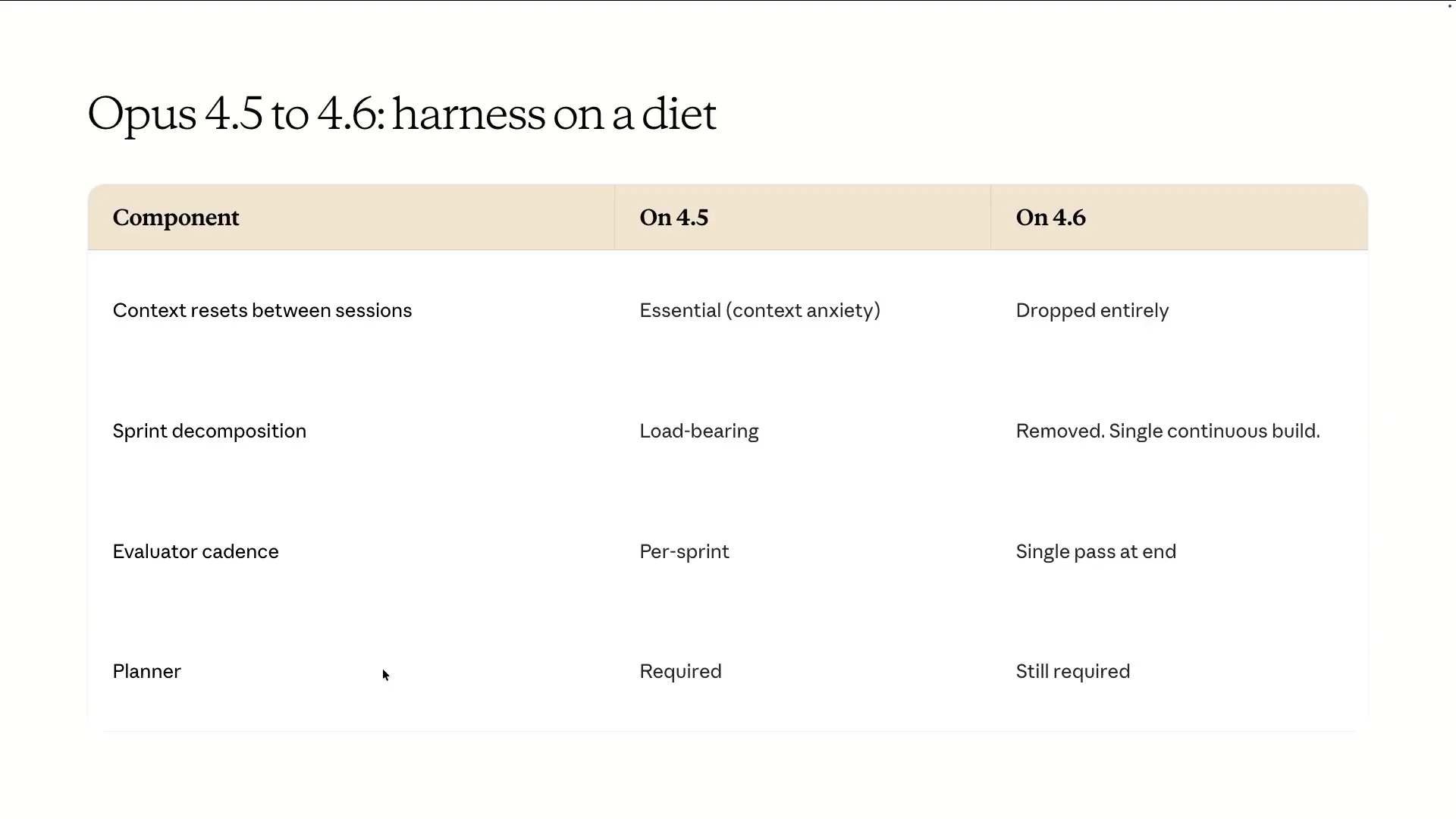 | The last topic I wanted to address is how to adjust your harness as models improve over time. There has been much discussion about whether Hans' design is still relevant, especially with models like Opus 4.6 and even Mythos-level models. It's crucial to understand the spiky behaviors of individual models and adapt your harness to address any gaps. Andrew mentioned context resetting between sessions, which we ultimately eliminated. Opus 4.5 struggled with context anxiety, but Opus 4.6 improved significantly in this area due to advancements in post-training. As a result, a single continuous session in compaction was sufficient to manage very long sessions effectively. |
Slide 80 — 35:46 (watch)
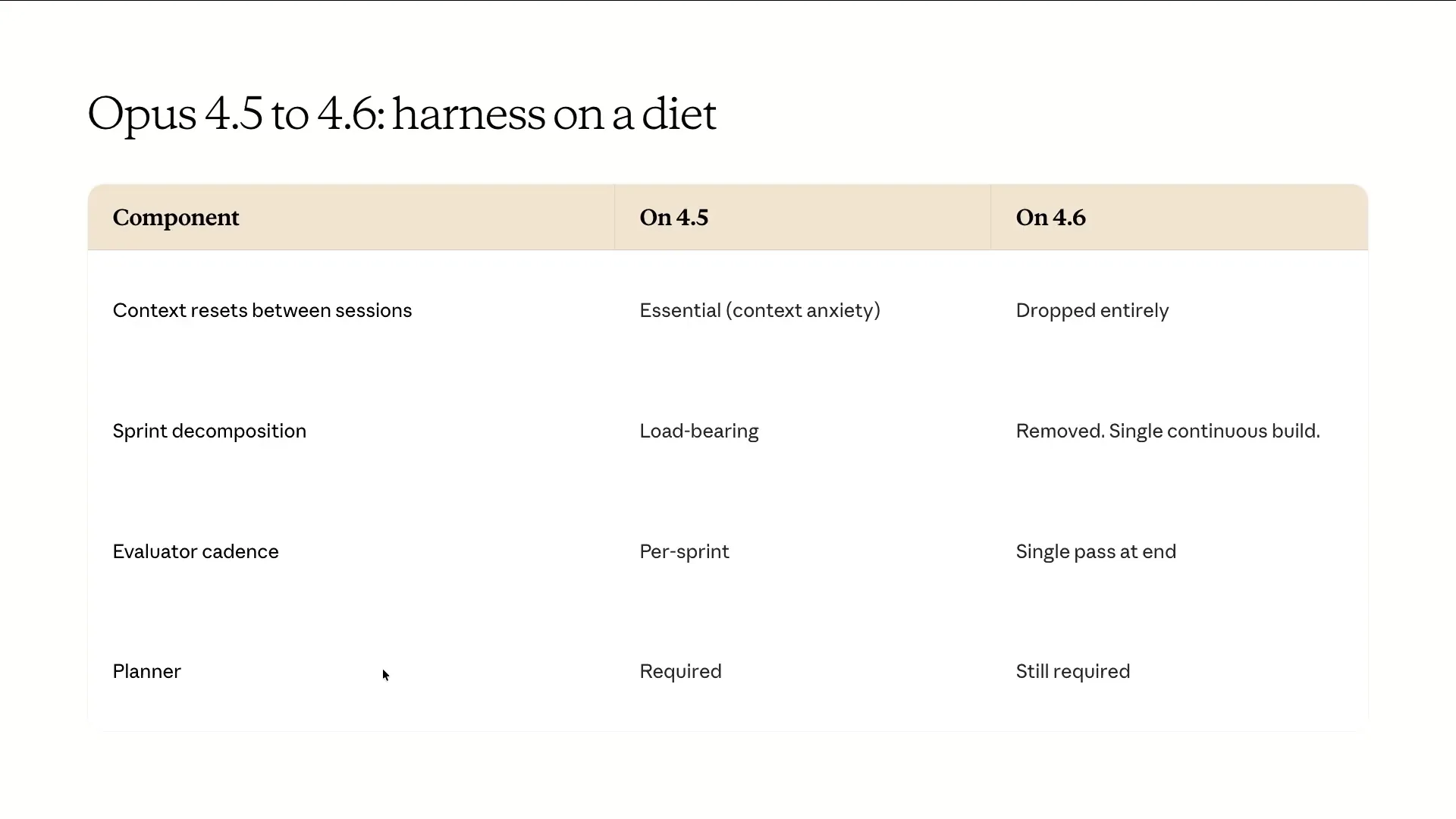 | We don't have a strong opinion on this, but it was critical for getting Opus 4.5 to work. Opus 4.6, however, was able to maintain a coherent two-hour continuous build without needing to be fed one feature at a time. The cadence for running the evaluator has changed; previously, we ran it at every sprint, but now we run it at the end of a one-shot generation from the model and then pass the results back. The harness remains the same, but we are simplifying the specific loops and the recipe involved. The lesson learned is that our harness was appropriate for 4.5, but as the frontier moved, we ran a simplified version to evaluate its performance. |
Slide 81 — 37:14 (watch)
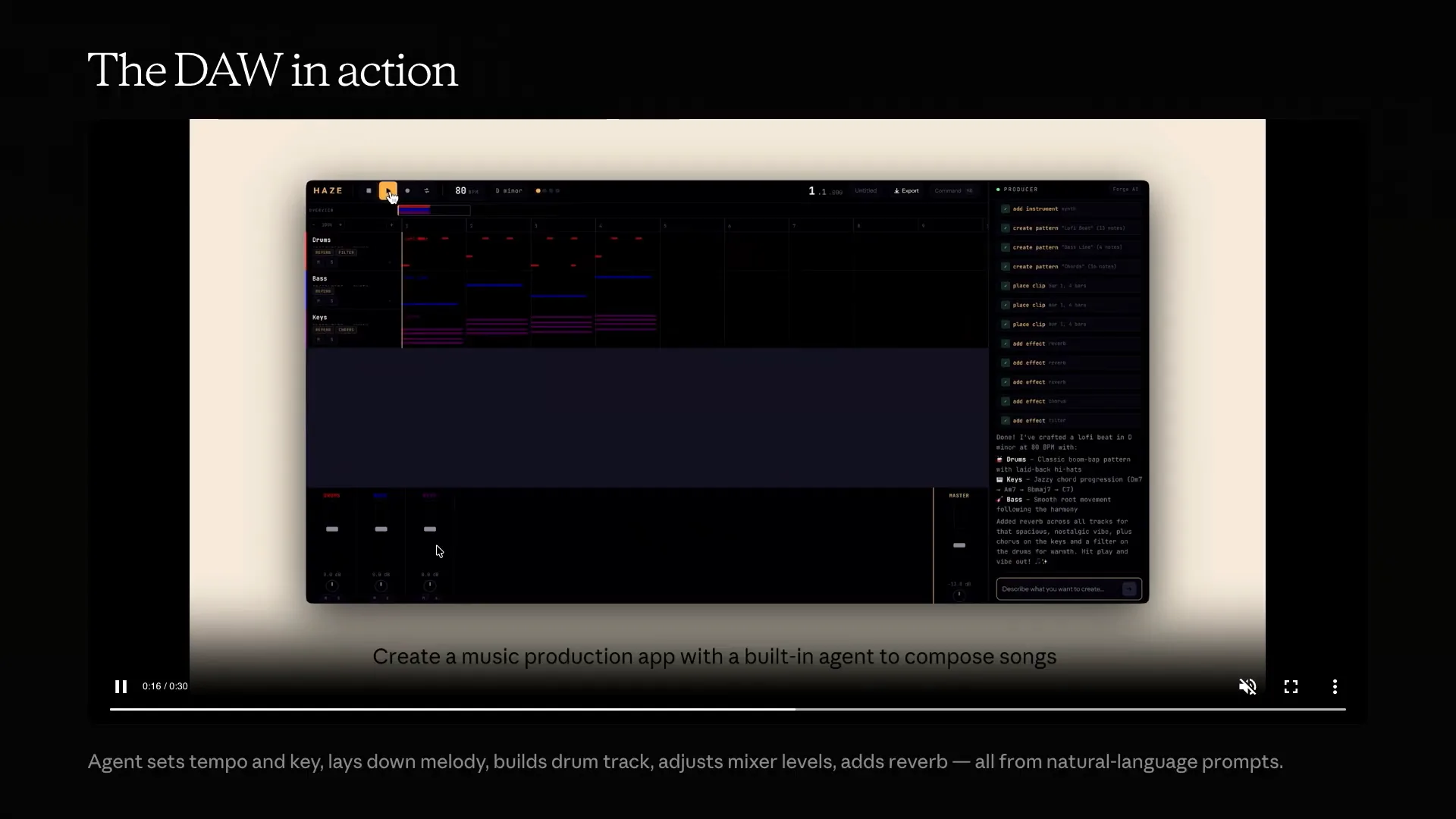 | This is what the final setup looks like today. The planner-generator-evaluator loop remains the core of our system, but we have removed several components that complicated the design. As mentioned, we prefer using a file system for shared state rather than relying on context windows for long-running agents. This example shows the simplified harness running with one of our latest models. While it is still expensive, it costs roughly half of what previous runs did due to the simplified approach, and it continues to operate over an extended period. This is an example of a Digital Audio Workstation (DAW), which is essentially a music-creating application. The agent sets the tempo and key, lays down the melody, and builds the drum tracks. The evaluator tests the app itself. We listened to the music produced, and while Claude can’t hear, the output was not great, but the app itself was well-developed. A model ago, this would not have been possible, but with just a few iterations, we achieved this result, demonstrating the meter curve Andrew discussed. I want to emphasize that you don’t need our internal harness to start thinking about these concepts. We are continuously working to integrate these primitives into code, but you can also build something similar on your own. We recently released auto-mode, which I find particularly useful for safer operations. We already have custom sub-agents as primitives, such as evaluators and QA roles, which can be enhanced with a strong system prompt and detailed rubric. Tools like Playwright MCP or Chrome MCP are excellent for web applications, or you can use computer vision if you’re developing native apps. |
Slide 82 — 39:06 (watch)
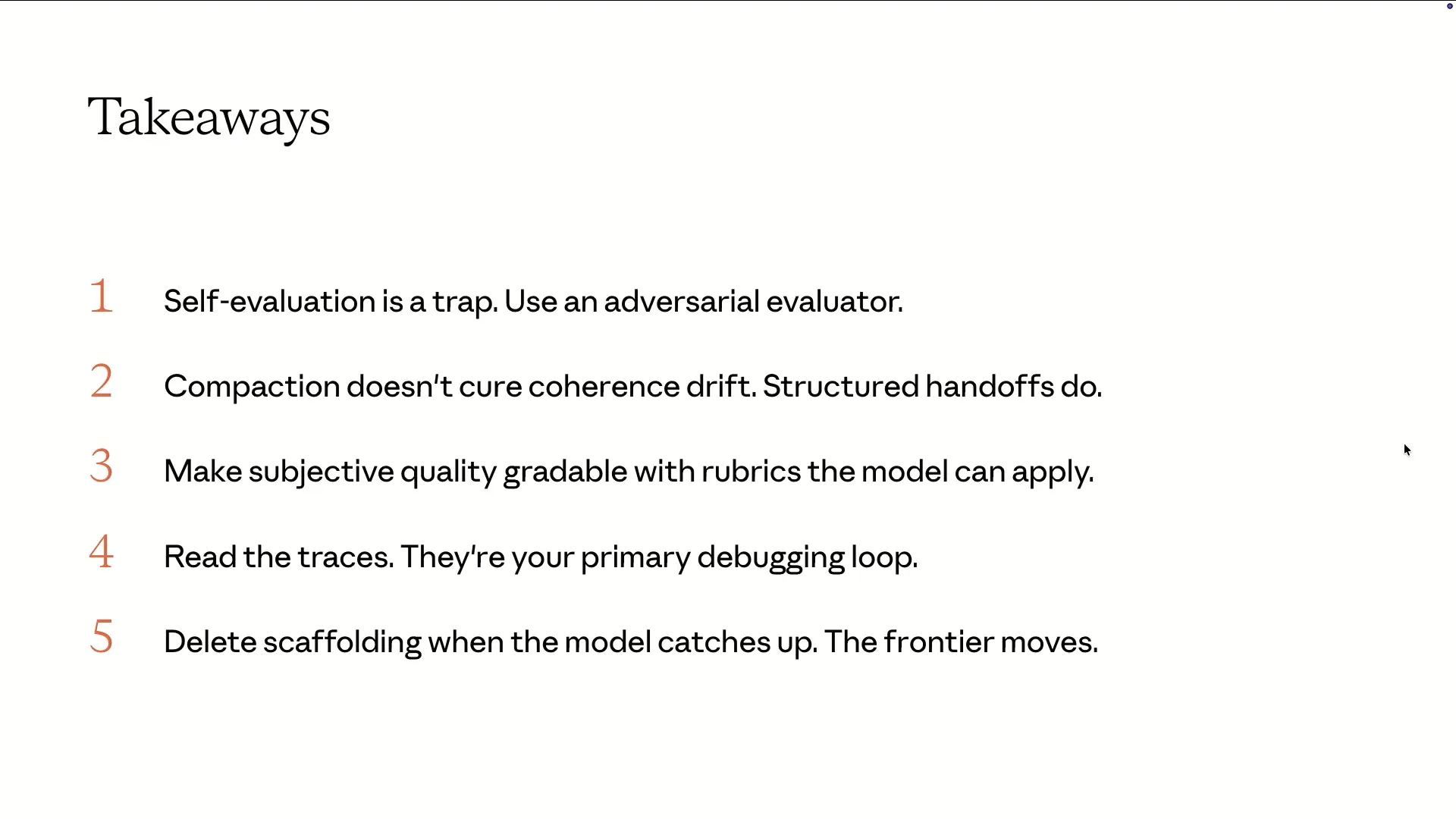 | Incorporating skills into your grading rubrics can enhance your development process. There are five key points to remember from this slide. First, be cautious with self-evaluation; it can be misleading. Instead, utilize an adversarial evaluator for more accurate assessments. |
Slide 83 — 39:28 (watch)
 | Compaction does not equal coherence. Lossy summaries can drift significantly. We have found that structured hand-offs and clean context are effective patterns. Subjective quality is gradable; if you have a strong opinion about how something should look, write it down. This practice has greatly improved the quality of applications that a model can generate. Finally, spend time with the model and read the traces. This will help you determine which parts of a scaffold to delete and which to keep, especially as the frontier evolves. That's all from me. |
Slide 84 — 40:04 (watch)
 | Thank you for listening. Please check out our blog post. I would like to open the floor for questions since we've been speaking for nearly an hour. If you have any questions for me or Andrew, feel free to ask. |
Slide 85 — 40:40 (watch)
 | We will do our best to answer your questions. One question I have for you is about improving the evaluator by analyzing logs. Is this done on a per-project basis, or is it more of a reusable secret sauce across projects? The goal is to make this process reusable. While anyone can tune it for a specific application, that approach is not much different from manually prompting for full code. The key is identifying common patterns that highlight the model's weak points. Regarding front-end design, we had a clear idea of what good design looks like. For example, we could provide examples of what a read-before-pro looks like. |
Slide 86 — 41:10 (watch)
 | This is an example of AI Slop. |
Slide 87 — 43:24 (watch)
 | This concept generalizes well beyond web apps. I appreciate the presentation; it was very interesting. I’m curious about your thoughts on the dump zone and smart zone of a model. Previously, the context limit was around 40 percent, but now, with 1 million contexts, it seems to be about 100,000. From what I understand, Ralph Loop was designed to address this issue by keeping the model within the smart zone, executing tasks below the 100,000 context threshold. Your presentation suggests moving away from this approach, as we can now rely on compaction and other methods. Are you advocating for this shift, or does the Ralph Loop model still have relevance given the smart and dump zone concepts? From both Ash’s and my presentations, you can see that with the 1 million context windows now generally available, we have a larger context to work with. The models have become more agentic, maintaining coherence over longer periods within that context window. With the release of version 4.6, we transitioned from using multiple context windows to a single long-running session with compaction. Whether to use multiple fresh sessions or one continuous session depends on your specific use case and evaluations based on what works best for you. For the general-purpose generator-evaluator pattern with Opus 4.6, we found that a single session is effective. Context rot is a limitation of today’s models, though it has improved compared to previous generations. There is still a place for the approach you mentioned, depending on your use case. However, I view it as something to eventually phase out as models improve. Regarding playwright, you mentioned playwright MCP and playwright skills. To enhance playwright, I suggest using playwright MCP or the code for Chrome MCP, which offers more robust browser control. Watching the model perform tasks might stem from a trust gap. Ideally, you want to set something in motion, trust it to execute the work accurately, and return to check the results. Initially, there may be some iteration where you monitor and read traces until you build that trust. Personally, in full-stack app development with Opus 4.6, I’ve reached a point where I can confidently rely on the model to handle network errors, console errors, and navigate applications effectively. The model’s vision capabilities have improved significantly, allowing it to identify overlapping text on elements, which was not feasible until the last generation of models. |
Slide 88 — 53:32 (watch)
 | I'm curious about the generator-evaluator pattern. Can you throw unlimited tokens at it, or will it stop if the evaluator is not effective enough? For example, if I ask it to create a game with specific features, the generator-evaluator pattern produces contracts and builds the apps. If I'm not satisfied with the output, can I restart the process and ask it to improve? Will the evaluator eventually give up and say, "This is it"? Interestingly, we found that with the 4.6-liner models, both Sonnet and Opus, the system was very willing to discard everything and start from scratch if it couldn’t effectively hill-climb against the evaluator’s rubric. This behavior surprised us because we expected some form of human intervention or a resume function to be necessary. Instead, we observed that the models were eager to restart rather than cling to their previous work. There have been instances where the evaluator seemed to get frustrated and suggested starting over, which resonates with my own experience as a human coder. Sometimes, I find it beneficial to clear out a messy codebase and begin anew for fresh context. It’s fascinating to see models reaching that point as well. You can also open the codebase in Cloud Code and continue from where you left off. We’re considering how to create a more iterative workflow, especially for complex applications where the time required for development is uncertain. The human element is crucial here, as project managers often deal with scope creep and timelines. We need to determine if there should be a feedback loop that involves the planner or if we can let engineers explore freely without constant oversight. In our approach, we insert the main specifications generated by the project manager into the sessions regularly to ensure everyone stays aligned on the project’s goals. The builder and evaluator focus on defining the exact feature set, tests, and contracts that meet the specifications. This high-level context is essential, but the evaluator’s role is not to intervene or edit the specifications directly. This loop can be applied in various ways, not limited to one generator and one builder. The adversarial trade-off can be extended to workflows involving multiple agents. For example, you could have a generator for synthetic datasets, a QA agent, and an integrator, all working together in a multi-step process. Each agent can have a distinct function within the workflow, allowing for tailored approaches depending on the task. |
Slide 89 — 1:04:36 (watch)
 | I want to ask about traceability. When I use superpowers or my own prompts to generate multiple sub-agents for my software or app, I often struggle to identify where things went wrong. My question is, what do you use for traceability when you have several agents running in the background? To be honest, a lot of it involves reading through traces by hand, which we do frequently at Anthropic. We also have some custom solutions where we direct Claude at various traces with specific prompts to help identify issues in the loop, such as where it deviated from expectations. However, the most effective method we use internally is still manual trace reading. This approach allows us to truly understand what the model is attempting to accomplish. |
Slide 90 — 1:10:46 (watch)
 | From Mercedes Benz Research and Development, I appreciate the talk. It seems similar to a scrum team or a feature team working over extended periods on a product. I was curious about how the human-in-the-loop concept fits into that scenario. Have you considered implementing a sprint review moment where a human can assess what has been built in the last couple of hours? We subject our agents to the same challenges that engineers face during scrum reviews. The overarching goal of this talk and our work is to explore how to build systems that minimize the need for human intervention. We aim to develop techniques that allow for autonomy in most processes. If human input is necessary, we might use hooks as a primary mechanism to inject specific stop conditions, such as an evaluator, allowing for developer feedback before continuing the loop. We are exploring this from a fully autonomous perspective rather than focusing solely on enhancing existing code. This is more of a greenfield exploration of agent design. If I had the opportunity to review the project a few hours in, I could potentially steer it in a better direction, resulting in a more refined outcome after eight hours. The question is whether this should be a permanent feature of the harness or just a temporary measure. Currently, we have many team members involved in building the harness. We run it in a loop, generating multiple iterations, where some succeed and others fail. We analyze the failures, adjust the prompts for the main harness, and iterate until we are satisfied. Ultimately, we aim to embed human oversight into the harness itself rather than relying on it as an afterthought. Regarding your question about building anything beyond greenfield projects, our work primarily focuses on greenfield applications. For brownfield projects, more control is often necessary as we develop our own rubrics and patterns. In brownfield scenarios, we see the entire software development lifecycle being automated. For example, autonomous monitoring could generate issue or feature requests that feed into an agent, which would then create a pull request, allowing for a review process before merging. While there are ways to automate the software development lifecycle in brownfield projects, this particular pattern is better suited for new applications. As for internal tooling, I can’t share too much detail, but many of the new features in Cloud Code incorporate lessons learned from this process. For instance, when working with the team, we apply principles from our discussions, such as how to prompt the main model to create a sub-agent or how to manage monitoring and bug-fixing loops. While it may not be a one-to-one application, we take the relevant aspects and adapt them to our specific needs. Regarding your question about reading traces, it involves reviewing the entire output. It’s essential to empathize with the model when building agents, as understanding the complete context is crucial. |
Slide 91 — 1:14:14 (watch)
 | An interesting anecdote from our work on the agent harness for Code for Chrome illustrates the importance of empathy in building agents. We conducted an experiment where participants navigated a web page with their eyes closed, only opening them every ten seconds to view a static page before closing them again. This exercise helped us understand the model's perspective and develop the empathetic skills necessary for effective interaction. Spending time with the models and analyzing their decisions line by line allows us to understand their reasoning and adjust our instructions for better performance. The success of Code for Chrome stemmed from our team's commitment to this practice, including simulating navigation challenges to enhance our understanding. |
Slide 92 — 1:15:04 (watch)
 | Taking those learnings and incorporating them into your prompt templates, Cloud.MD, or skill development can help you avoid similar behaviors in the future. Cloud Code now features auto memory for sessions, which continuously memorizes details as it operates. You can quickly identify potential issues by reviewing traces. We can wrap up here; we have a few minutes left for questions or discussions. Thank you for attending our session today. |
Slide 93 — 1:15:32 (watch)
 | Microsoft Mechanics www.microsoft.com |